Jan 8, 2019
TechnologyReference
Refers to :
https://github.com/kubernetes-sigs/kubespray/tree/master/contrib/dind
Tips
Use custom docker images:
# sudo docker pull ubuntu:16.04
# sudo docker run -it ubuntu:16.04 /bin/bash
root@d962689eb1ad:/etc/apt/apt.conf.d# echo>docker-clean
# docker commit  d962689eb1ad ubuntu:own
Thus the docker clean won’t take effect, we could save all of the pkgs.
Modify the images:
$ pwd
/home/vagrant/kubespray-2.8.1/contrib/dind
$ vim ./group_vars/all/distro.yaml
    image: "ubuntu:own"
now follow the official guideline, be sure you modify the docker’s definition.
# vim roles/kubespray-defaults/defaults/main.yaml
  {%- if docker_version is version('17.05', '<') %}
  --graph={{ docker_daemon_graph }} {{ docker_log_opts }}
  {%- else %}
  --graph={{ docker_daemon_graph }} {{ docker_log_opts }}
  {%- endif %}
!!!But!!!, this will break the right logic of the kubespray itself.
Command:
cd contrib/dind
ansible-playbook -i hosts dind-cluster.yaml --extra-vars node_distro=ubuntu

cd ../..
CONFIG_FILE=inventory/local-dind/hosts.ini /tmp/kubespray.dind.inventory_builder.sh
ansible-playbook --become -e ansible_ssh_user=ubuntu -i inventory/local-dind/hosts.ini cluster.yml --extra-vars @contrib/dind/kubespray-dind.yaml --extra-vars bootstrap_os=ubuntu
Meaning
The meaning of using dind for kubespray is: we could quickly get the offline
packages and docker images when kubespray release upgrades.
Jan 4, 2019
TechnologyReason
The ssl lifetime is only 1 year, we need to changes it to 100 years.
Steps
Check out the specific version:
# git clone  https://github.com/kubernetes/kubernetes
# git checkout tags/v1.12.3 -b 1.12.3_local
Now edit the cert.go file:
# vim vendor/k8s.io/client-go/util/cert/cert.go

		NotAfter:              now.Add(duration365d * 100).UTC(),    // line 66
		NotAfter:     time.Now().Add(duration365d * 100).UTC(),  // line 111
	maxAge := time.Hour * 24 * 365 * 100         // one year self-signed certs  // line 96
		maxAge = 100 * time.Hour * 24 * 365 // 100 years fixtures  // line 110
		NotAfter:    validFrom.Add(100 * maxAge), // line 152, 124
Then build using following command:
# make all WHAT=cmd/kubeadm GOFLAGS=-v
# ls  _output/bin/kubeadm
Now using the newly generated kubeadm for replacing kubespray’s kubeadm.
Also you have to change the sha256sum of the kubeadm which exists in
roles/download/defaults/main.yml:
kubeadm_checksums:
  v1.12.4: bc7988ee60b91ffc5921942338ce1d103cd2f006c7297dd53919f4f6d16079fa
  #v1.12.4: 674ad5892ff2403f492c9042c3cea3fa0bfa3acf95bc7d1777c3645f0ddf64d7
deploy a cluster again, this time you will get a 100-year signature:
root@k8s-1:/etc/kubernetes/ssl# pwd
/etc/kubernetes/ssl
root@k8s-1:/etc/kubernetes/ssl# for i in `ls *.crt`; do openssl x509 -in $i -noout -dates; done | grep notAfter
notAfter=Dec 11 05:34:10 2118 GMT
notAfter=Dec 11 05:34:11 2118 GMT
notAfter=Dec 11 05:34:10 2118 GMT
notAfter=Dec 11 05:34:11 2118 GMT
notAfter=Dec 11 05:34:12 2118 GMT
v1.12.5
Update the v1.12.5
#  git remote -v
#  git fetch origin
#  git checkout tags/v1.12.5 -b 1.12.5_local
# git branch
  1.12.3_local
  1.12.4_local
* 1.12.5_local
  master
......make some changes.....
# make all WHAT=cmd/kubeadm GOFLAGS=-v
# ls  _output/bin/kubeadm
4. kubeadm git tree state
Modify the file hack/lib/version.sh:
  if [[ -n ${KUBE_GIT_COMMIT-} ]] || KUBE_GIT_COMMIT=$("${git[@]}" rev-parse "HEAD^{commit}" 2>/dev/null); then
    if [[ -z ${KUBE_GIT_TREE_STATE-} ]]; then
      # Check if the tree is dirty.  default to dirty
      if git_status=$("${git[@]}" status --porcelain 2>/dev/null) && [[ -z ${git_status} ]]; then
        KUBE_GIT_TREE_STATE="clean"
      else
        KUBE_GIT_TREE_STATE="clean"
      fi
    fi
golang issue
build kubeadm 1.14.1 requires golang newer than golang 1.12.
# wget https://dl.google.com/go/go1.12.2.linux-amd64.tar.gz
# tar -xvf go1.12.2.linux-amd64.tar.gz
# sudo mv go /usr/local
# vim ~/.bashrc
export GOROOT=/usr/local/go
export PATH=$GOPATH/bin:$GOROOT/bin:$PATH
export GOPATH=/root/go/
# source ~/.bashrc
# go version
go version go1.12.2 linux/amd64
Now you could use the newer golang builder for building the v1.14.1 kubeadm.
1.14.1 kubeadm timestamp
Before:
# pwd
/etc/kubernetes/ssl
# for i in `ls *.crt`; do openssl x509 -in $i -noout -dates; done | grep notAfter
notAfter=May  4 07:20:04 2020 GMT
notAfter=May  4 07:20:03 2020 GMT
notAfter=May  2 07:20:03 2029 GMT
notAfter=May  2 07:20:04 2029 GMT
notAfter=May  4 07:20:05 2020 GMT
After replacement:
notAfter=May  4 08:13:02 2020 GMT
notAfter=May  4 08:13:02 2020 GMT
notAfter=Apr 11 08:13:01 2119 GMT
notAfter=Apr 11 08:13:02 2119 GMT
notAfter=May  4 08:13:03 2020 GMT
Seems failed, so I have to change again.
Add modification:
./cmd/kubeadm/app/util/pkiutil/pki_helpers.go
                NotAfter:     time.Now().Add(duration365d * 100 ).UTC(),  // line 578
arm64(kubernetes 1.14.3 version)
golang 1.12.2 arm64 version download:
# wget https://dl.google.com/go/go1.12.2.linux-arm64.tar.gz
# tar xzvf go1.12.2.linux-arm64.tar.gz
# sudo mv go /usr/local
# vim ~/.bashrc
export GOROOT=/usr/local/go
export PATH=$GOPATH/bin:$GOROOT/bin:$PATH
export GOPATH=/root/go/
# source ~/.bashrc
# go version
go version go1.12.2 linux/arm64
Download the k8s 1.14.3 source code and unzip it:
# unzip kubernetes-1.14.3.zip
# cd kubernetes-1.14.3
modify the hack/lib/version.sh KUBE_GIT_TREE_STATE all to clean.
Also change following two files:
root@arm02:~/Code/kubernetes-1.14.3# vim cmd/kubeadm/app/util/pkiutil/pki_helpers.go
root@arm02:~/Code/kubernetes-1.14.3# vim vendor/k8s.io/client-go/util/cert/cert.go
root@arm02:~/Code/kubernetes-1.14.3#  make all WHAT=cmd/kubeadm GOFLAGS=-v

v1.15.3
Via following steps:
# cd YOURKUBERNETES_FOLDER
# git fetch origin
# git checkout tags/v1.15.3 -b 1.15.3_local
# vim hack/lib/version.sh
      if git_status=$("${git[@]}" status --porcelain 2>/dev/null) && [[ -z ${git_status} ]]; then
        KUBE_GIT_TREE_STATE="clean"
      else
        KUBE_GIT_TREE_STATE="clean"
# vim cmd/kubeadm/app/constants/constants.go
        CertificateValidity = time.Hour * 24 * 365 *100
# vim vendor/k8s.io/client-go/util/cert/cert.go
edit the same as in v1.12.5
		NotAfter:              now.Add(duration365d * 100).UTC(),    // line 66
		NotAfter:     time.Now().Add(duration365d * 100).UTC(),  // line 111
	maxAge := time.Hour * 24 * 365 * 100         // one year self-signed certs  // line 96
		maxAge = 100 * time.Hour * 24 * 365 // 100 years fixtures  // line 110
		NotAfter:    validFrom.Add(100 * maxAge), // line 152, 124
# make all WHAT=cmd/kubeadm GOFLAGS=-v
# ls  _output/bin/kubeadm
注意: v1.15.3中, CertificateValidity变量定义为100年后,不需修改pki_helper.go文件内容。
v1.16.3
Compile it on local:
# wget https://codeload.github.com/kubernetes/kubernetes/zip/v1.16.3
# unzip kubernetes-1.16.3.zip
# cd kubernetes-1.16.3
########################
### Make source code changes
# Notice the gittree status changes from archived to clean
########################
#####  Install golang
# sudo add-apt-repository ppa:longsleep/golang-backports
# sudo apt-key adv --keyserver keyserver.ubuntu.com --recv-keys  F6BC817356A3D45E
# sudo apt-get update
# sudo apt-get install golang-1.12
# sudo apt-get purge golang-go
# vim ~/.profile
Add:
PATH="$PATH:/usr/lib/go-1.12/bin"
# source ~/.profile
# make all WHAT=cmd/kubeadm GOFLAGS=-v
Cause kubeadm currently(2019.12) should be compiled with golang-1.12.
output result:
➜  kubernetes-1.16.3 cd _output/bin
➜  bin ls
conversion-gen  deepcopy-gen  defaulter-gen  go2make  go-bindata  kubeadm  openapi-gen
➜  bin ./kubeadm version
kubeadm version: &version.Info{Major:"1", Minor:"16", GitVersion:"v1.16.3", GitCommit:"b3cbbae08ec52a7fc73d334838e18d17e8512749", GitTreeState:"clean", BuildDate:"2019-12-24T07:07:11Z", GoVersion:"go1.12.8", Compiler:"gc", Platform:"linux/amd64"}
Dec 31, 2018
TechnologyChanges
1. download items
In kubespray-2.8.1/roles/download/defaults/main.yml, get download info from
following definition:
kubeadm_download_url: "https://storage.googleapis.com/kubernetes-release/release/{{ kubead
m_version }}/bin/linux/{{ image_arch }}/kubeadm"
hyperkube_download_url: "https://storage.googleapis.com/kubernetes-release/release/{{ kube
_version }}/bin/linux/amd64/hyperkube"
cni_download_url: "https://github.com/containernetworking/plugins/releases/download/{{ cni
_version }}/cni-plugins-{{ image_arch }}-{{ cni_version }}.tgz"
The cni_version is defined in following file:
./roles/download/defaults/main.yml:cni_version: "v0.6.0"
Download from following position:
https://storage.googleapis.com/kubernetes-release/release/v1.12.4/bin/linux/amd64/kubeadm
https://storage.googleapis.com/kubernetes-release/release/v1.12.4/bin/linux/amd64/hyperkube
https://github.com/containernetworking/plugins/releases/download/v0.6.0/cni-plugins-amd64-v0.6.0.tgz
Changes to:
#kubeadm_download_url: "https://storage.googleapis.com/kubernetes-release/release/{{ kubeadm_version }}/bin/linux/{{ image_arch }}/kubeadm"
#hyperkube_download_url: "https://storage.googleapis.com/kubernetes-release/release/{{ kube_version }}/bin/linux/amd64/hyperkube"
etcd_download_url: "https://github.com/coreos/etcd/releases/download/{{ etcd_version }}/etcd-{{ etcd_version }}-linux-amd64.tar.gz"
#cni_download_url: "https://github.com/containernetworking/plugins/releases/download/{{ cni_version }}/cni-plugins-{{ image_arch }}-{{ cni_version }}.tgz"
kubeadm_download_url: "http://portus.xxxx.com:8888/kubeadm"
hyperkube_download_url: "http://portus.xxxx.com:8888/hyperkube"
cni_download_url: "http://portus.xxxx.com:8888/cni-plugins-{{ image_arch }}-{{ cni_version }}.tgz"
2. dashboard
kubespray-2.8.1/roles/kubernetes-apps/ansible/templates/dashboard.yml.j2, add NodePort definition:
spec:
+  type: NodePort
  ports:
    - port: 443
      targetPort: 8443
3. bootstrap-os
Added in files:
portus.crt
server.crt
ntp.conf
kubespray-2.8.1/roles/bootstrap-os/tasks/bootstrap-ubuntu.yml, modify according to previous version.
4. kube-deploy
TBD, changes later
5. reset
kubespray-2.8.1/roles/reset/tasks/main.yml
    - /etc/cni
    - "{{ nginx_config_dir }}"
#    - /etc/dnsmasq.d
#    - /etc/dnsmasq.conf
#    - /etc/dnsmasq.d-available
6. inventory definition
/kubespray-2.8.1/inventory/sample/group_vars/k8s-cluster/addons.yml
enable helm and metric-server
Edit kubespray-2.8.1/inventory/sample/group_vars/k8s-cluster/k8s-cluster.yml file:
helm_stable_repo_url: "https://portus.xxxx.com:5000/chartrepo/kubesprayns"

also notice the version of kubeadm, for example v1.12.4
remove the hosts.ini file.
7. kubeadm images
Use an official vagrant definition for downloading kubeadm images.
Vagrant temp
Vagrant create temp machines.
Stop the service:
sudo systemctl stop secureregistryserver.service
Remove the old registry data, and start a new instance
sudo rm -rf /usr/local/secureregistryserver/data/*
sudo systemcel start secureregistryserver.service
Load:
scp ./all.tar.bz2 vagrant@172.17.129.101:/home/vagrant
sudo docker load<all.tar.bz2
Then docker push all of the loaded images, compress the folder:
sudo systemcel stop secureregistryserver.service
tar cvf /usr/local/secureregistryserver/
xz /usr/local/secureregistryserver.tar
With the tar.xz, contains all of the offline images.
Dec 12, 2018
TechnologySteps
Rook:
# docker save rook/ceph:master>ceph.tar; xz ceph.tar
# docker load<ceph.tar
# docker tag rook/ceph:master docker.registry/library/rook/ceph:master
# kubectl -n rook-ceph-system get pod -o wide
NAME                                 READY   STATUS    RESTARTS   AGE   IP                NODE       NOMINATED NODE
rook-ceph-agent-lf7zm                1/1     Running   0          11s   192.192.189.124   allinone   <none>
rook-ceph-operator-d88b68dd9-rfqws   1/1     Running   0          19m   10.233.81.146     allinone   <none>
rook-discover-rtghr                  1/1     Running   0          11s   10.233.81.149     allinone   <none>
label:
# kubectl label nodes allinone ceph-mon=enabled
# kubectl label nodes allinone ceph-osd=enabled
# kubectl label nodes allinone ceph-mgr=enabled
Add one disk:
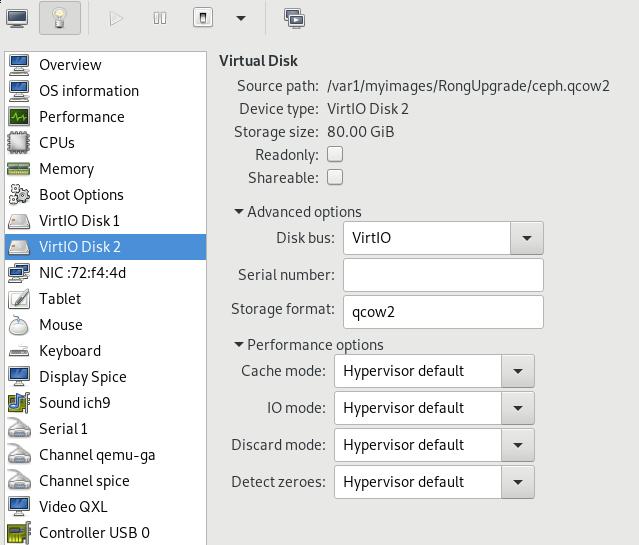
Examine via:
# fdisk -l /dev/vdb

Disk /dev/vdb: 85.9 GB, 85899345920 bytes, 167772160 sectors
Units = sectors of 1 * 512 = 512 bytes
Sector size (logical/physical): 512 bytes / 512 bytes
I/O size (minimum/optimal): 512 bytes / 512 bytes
Modify the cluster.yml file:
    config:
      # The default and recommended storeType is dynamically set to bluestore for devices and filestore for directories.
      # Set the storeType explicitly only if it is required not to use the default.
      # storeType: bluestore
      databaseSizeMB: "1024" # this value can be removed for environments with normal sized disks (100 GB or larger)
      journalSizeMB: "1024"  # this value can be removed for environments with normal sized disks (20 GB or larger)
    nodes:
    - name: "allinone"
      devices: # specific devices to use for storage can be specified for each node
      - name: "vdb"
# kubectl apply -f cluster.yaml
MOdify to newest version, becase the master is older than our pulled images.
depend on ceph:
#  sudo docker pull ceph/ceph:v13
# kubectl -n rook-ceph get pod -o wide  -w
# # kubectl -n rook-ceph get pod -o wide
NAME                                   READY   STATUS      RESTARTS   AGE   IP              NODE       NOMINATED NODE
rook-ceph-mgr-a-588c74548f-wb4db       1/1     Running     0          74s   10.233.81.156   allinone   <none>
rook-ceph-mon-a-6cf75949cd-vqbfb       1/1     Running     0          89s   10.233.81.155   allinone   <none>
rook-ceph-osd-0-88d6dd79d-r9cxc        1/1     Running     0          49s   10.233.81.158   allinone   <none>
rook-ceph-osd-prepare-allinone-zgcjz   0/2     Completed   0          59s   10.233.81.157   allinone   <none>
# lsblk
# lsblk |grep vdb
vdb         252:16   0   80G  0 disk
Get the password:
# kubectl edit svc rook-ceph-mgr-dashboard -n rook-ceph
type: NodePort
service/rook-ceph-mgr-dashboard edited
# MGR_POD=`kubectl get pod -n rook-ceph | grep mgr | awk '{print $1}'`
# kubectl -n rook-ceph logs $MGR_POD | grep password
2018-12-12 08:10:16.478 7f7062038700  0 log_channel(audit) log [DBG] : from='client.4114 10.233.81.152:0/963276398' entity='client.admin' cmd=[{"username": "admin", "prefix": "dashboard set-login-credentials", "password": "8XOWZALcFO", "target": ["mgr", ""], "format": "json"}]: dispatch
View dashboard via:
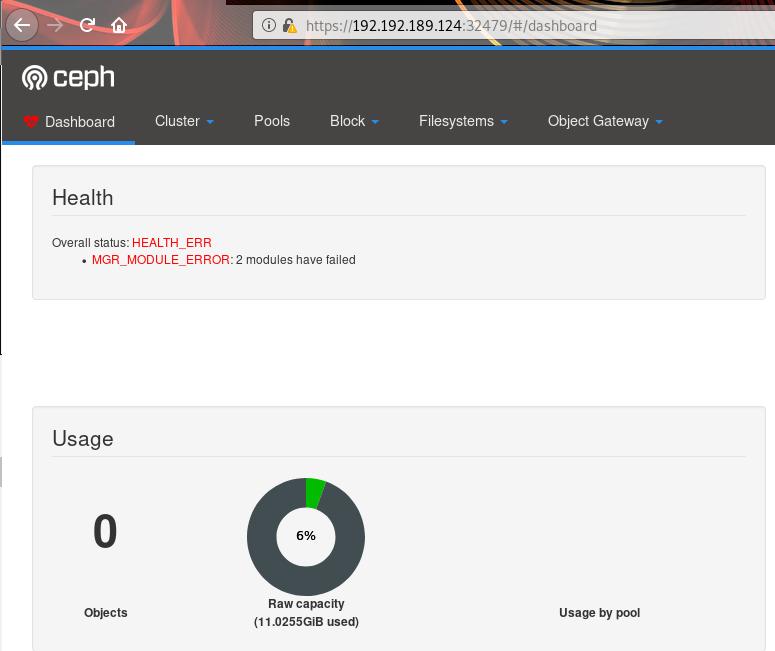
Create pool and storagepool:
# kubectl apply -f pool.yaml
cephblockpool.ceph.rook.io/replicapool created
# kubectl  apply -f storageclass.yaml
cephblockpool.ceph.rook.io/replicapool configured
storageclass.storage.k8s.io/rook-ceph-block created
# kubectl get sc
NAME              PROVISIONER          AGE
rook-ceph-block   ceph.rook.io/block   3s
其他部分的更改就省略掉。
ToDo
- busybox需要上传到中心服务器。
- 各个节点服务器需要load busybox的镜像。
- 需要整合ansible,以便安装。
Dec 11, 2018
Technology初始化配置
按照AI组的设想,基于Ubuntu16.04来做,后续其实也可以基于Ubuntu16.05来做,应该是一样的。
创建一个虚拟机,192.168.122.177/24, 安装好redsocks.
visudo(nopasswd), apt-get install -y nethogs build-essential libevent-dev.
做成基础镜像后,关机,undefine此虚拟机。
#
