Aug 12, 2015
TechnologyPackage Preparation
First you should enable the repository via:
# wget http://yum.spacewalkproject.org/2.3/RHEL/6/x86_64/spacewalk-repo-2.3-4.el6.noarch.rpm
# rpm -ivh spacewalk-repo-2.3-4.el6.noarch.rpm
# vim /etc/yum.repos.d/jpackage-repo.repo
[jpackage-generic]
name=JPackage generic
#baseurl=http://mirrors.dotsrc.org/pub/jpackage/5.0/generic/free/
mirrorlist=http://www.jpackage.org/mirrorlist.php?dist=generic&type=free&release=5.0
enabled=1
gpgcheck=1
gpgkey=http://www.jpackage.org/jpackage.asc
Install the spacewalk-remote-utils package:
# yum install -y spacewalk-remote-utils
WebUI Create Repository
Create an ia32-debian based channel, in WebUI:
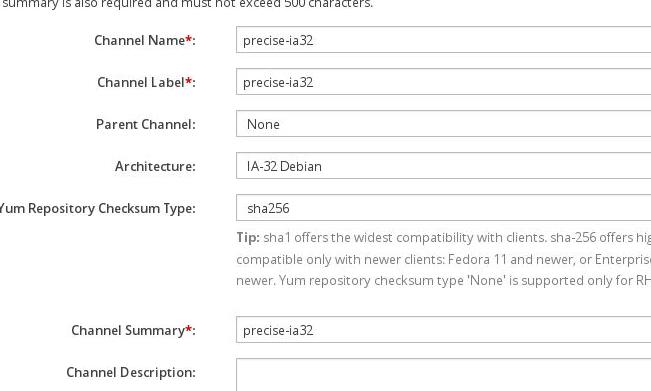
Continue to create some child channel:

Now create the repository like following:
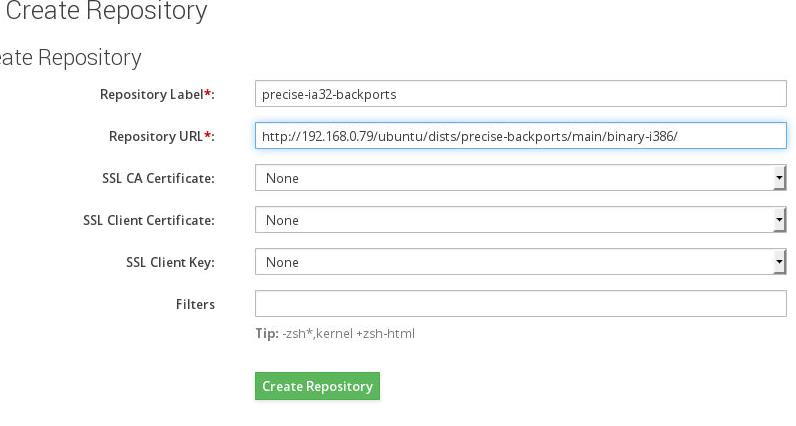
Until you created all of the ia32 based repositories:

Associate the repository with channels.
Sync Repositories
Use following scripts for syncing the packages into the system:
# vim precise-update.sh
until spacewalk-debian-sync.pl --username xxxxx --password xxxx --channel 'precise-ia32-updates' --url 'http://192.168.0.79/ubuntu/dists/precise-updates/main/binary-i386/'
do
        echo "retry again"
        sleep 30
done
# sh precise-update.sh
INFO: Repo URL: http://192.168.0.79/ubuntu/dists/precise-updates/main/binary-i386/
INFO: Ubuntu root is http://192.168.0.79/ubuntu/
INFO: Fetching Packages.gz... done
........
Aug 12, 2015
TechnologyProblem
On Clients(Ubuntu nodes), you will see lots of the following message in
/var/log/osad:
$ tail /var/log/osad
2015-08-11 19:31:14 jabber_lib.main: Unable to connect to jabber servers, sleeping 78 seconds
2015-08-11 19:32:32 jabber_lib.main: Unable to connect to jabber servers, sleeping 117 seconds
When restart the osda service you will see following error message:
# service osad restart
OSAD SpaceWalk Deamon osad                                                     Traceback (most recent call last):
  File "/usr/share/rhn/osad/jabber_lib.py", line 252, in setup_connection
    c = self._get_jabber_client(js)
  File "/usr/share/rhn/osad/jabber_lib.py", line 309, in _get_jabber_client
    c.connect()
  File "/usr/share/rhn/osad/jabber_lib.py", line 583, in connect
    self.disconnect()
  File "/usr/share/rhn/osad/jabber_lib.py", line 653, in disconnect
    jabber.Client.disconnect(self)
  File "/usr/lib/python2.7/dist-packages/jabber/jabber.py", line 432, in disconnect
    xmlstream.Client.disconnect(self)
  File "/usr/lib/python2.7/dist-packages/jabber/xmlstream.py", line 388, in disconnect
    while self.process(): pass
  File "/usr/share/rhn/osad/jabber_lib.py", line 1059, in process
    raise JabberError("Premature EOF")
JabberError: Premature EOF
Though seeing this error, your osad will start and running, but with errors.
Trouble Shooting
Make sure the port 5222 and 5269 of spacewalk server are telnet-able from client machine:
adminubuntu@spacewalknode1:~$ telnet spacewalk 5222
Trying 10.11.11.3...
Connected to spacewalk.
Escape character is '^]'.
^]
telnet> quit
Connection closed.
adminubuntu@spacewalknode1:~$ telnet spacewalk 5269
Trying 10.11.11.3...
Connected to spacewalk.
Escape character is '^]'.
^]
telnet>
Make sure you register yourself on client using FQDN but not the IP Address:
# rhnreg_ks --activationkey=1-precise --serverUrl=http://spacewalk/XMLRPC --force
# service osad restart
If by this you won’t pass the osad check, you should setup the local dns server, which
enable name resolve of spacewalk, you could take following article for reference:
http://purplepalmdash.github.io/blog/2015/08/05/enable-dhcp-slash-dns-server-for-spacewalker-server/
For checking the dns resole, run following command on client:
adminubuntu@spacewalknode1:~$ dig spacewalk

; <<>> DiG 9.8.1-P1 <<>> spacewalk
;; global options: +cmd
;; Got answer:
;; ->>HEADER<<- opcode: QUERY, status: NOERROR, id: 16045
;; flags: qr aa rd ra; QUERY: 1, ANSWER: 1, AUTHORITY: 1, ADDITIONAL: 0

;; QUESTION SECTION:
;spacewalk.                     IN      A

;; ANSWER SECTION:
spacewalk.              604800  IN      A       10.11.11.3

;; AUTHORITY SECTION:
spacewalk.              604800  IN      NS      spacewalk.

;; Query time: 2 msec
;; SERVER: 10.11.11.3#53(10.11.11.3)
;; WHEN: Wed Aug 12 03:34:18 2015
;; MSG SIZE  rcvd: 57
Result
After resolving this problem, your log should like this:
On Server:
$ tail /var/log/message
Aug 12 10:34:50 spacewalk jabberd/c2s[1379]: [9] [::ffff:10.11.11.100, port=45486] connect
Aug 12 10:34:50 spacewalk named[993]: error (network unreachable) resolving 'ns4.p27.dynect.net/A/IN': 2001:500:94::100#53
Aug 12 10:34:50 spacewalk jabberd/c2s[1379]: [9] created user: user=osad-c942811c1c; realm=
Aug 12 10:34:50 spacewalk jabberd/c2s[1379]: [9] registration succeeded, requesting user creation: jid=osad-c942811c1c@spacewalk
Aug 12 10:34:50 spacewalk jabberd/sm[1371]: created user: jid=osad-c942811c1c@spacewalk
Aug 12 10:34:50 spacewalk jabberd/c2s[1379]: [9] legacy authentication succeeded: host=, username=osad-c942811c1c, resource=osad, TLS negotiated
Aug 12 10:34:50 spacewalk jabberd/c2s[1379]: [9] requesting session: jid=osad-c942811c1c@spacewalk/osad
Aug 12 10:34:50 spacewalk jabberd/sm[1371]: session started: jid=osad-c942811c1c@spacewalk/osad
In SpaceWalk backend you will see:
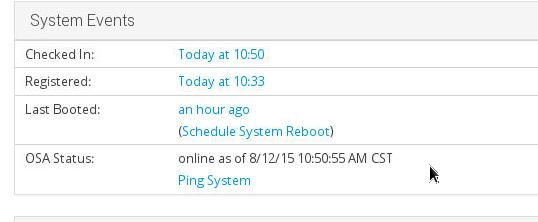
Now you could direct push your modification to clients in SpaceWalk backend.
Aug 11, 2015
TechnologySpaceWalk Backend Configruation
First Create the Channel:
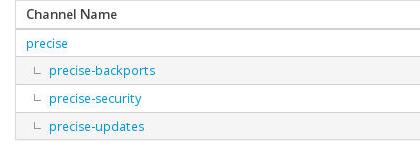
Then Create the Repository like following:

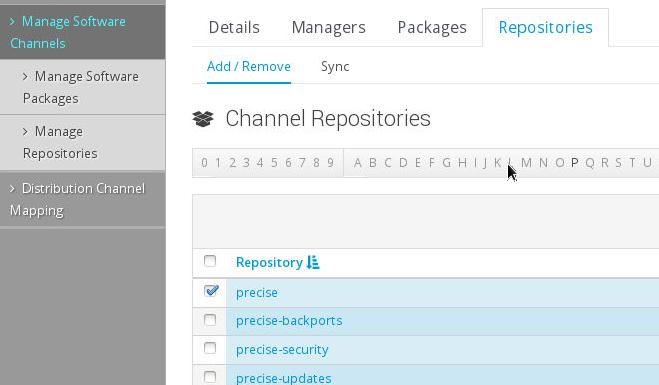
Associate the channel together with repository:
Install packages
Do following for the prerequisition for syncing the repository.
# yum update python-debian
# vim  /usr/lib/python2.6/site-packages/debian/debfile.py
PART_EXTS = ['gz', 'xz', 'lzma']
# wget http://dl.fedoraproject.org/pub/epel/6/x86_64/epel-release-6-8.noarch.rpm
# rpm -ivh epel-release-6-8.noarch.rpm
# cat epel-testing.repo  | more
[epel-testing]
name=Extra Packages for Enterprise Linux 6 - Testing - $basearch
#baseurl=http://download.fedoraproject.org/pub/epel/testing/6/$basearch
#mirrorlist=https://mirrors.fedoraproject.org/metalink?repo=testing-epel6&arch=$basearch
baseurl=http://mirrors.aliyun.com/epel/testing/6/x86_64/
failovermethod=priority
Sync With Local Repository
An example of precise-backports is listed like following, take this example for
example, create other 3 shell scripts:
# cat precise-backports.sh
until spacewalk-debian-sync.pl --username xxxxx --password xxxxxx --channel 'precise-backports' --url 'http://192.168.0.79/ubuntu/dists/precise-backports/main/binary-amd64/'
do
        echo "retry again"
        sleep 30
done
# ls *.sh
precise-backports.sh  precise-security.sh  precise.sh  precise-update.sh
Sync repository via sh precise-backports.sh or other scripts.
After a long while, you repository will be updated.
Aug 10, 2015
TechnologyInstall via:
$ sudo apt-get install debhelper build-essential gcc devscripts git intltool quilt \
automake python-all-dev libnl-route-3-dev asciidoc pkg-config libxml2-utils \
docbook-xml xsltproc sgml-data docbook-xs
$ sudo apt-get install apt-transport-spacewalk rhnsd
Fix the bug of XMLRPCLib:
--- /usr/lib/python2.7/xmlrpclib.py 2013-05-28 20:44:38.000000000 +0200
+++ new/xmlrpclib.py 2013-05-28 20:44:24.000000000 +0200
@@ -654,8 +654,8 @@
f(self, value, write)

def dump_nil (self, value, write):
- if not self.allow_none:
- raise TypeError, "cannot marshal None unless allow_none is enabled"
+# if not self.allow_none:
+# raise TypeError, "cannot marshal None unless allow_none is enabled"
write("<value><nil/></value>")
dispatch[NoneType] = dump_nil
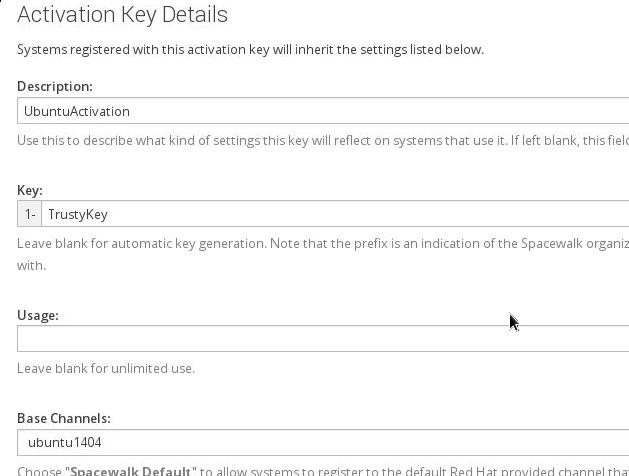
Create a key for managing trusty clients:
Register with SpaceWalk Server:
$ sudo mkdir /var/lock/subsys
$ sudo rhnreg_ks --activationkey=1-TrustyKey --serverUrl=http://10.9.10.13/XMLRPC
Warning: unable to enable rhnsd with chkconfig
Seeing the warning doesn’t matter. Now your computer is registered into the SpaceWalker
Root Node.
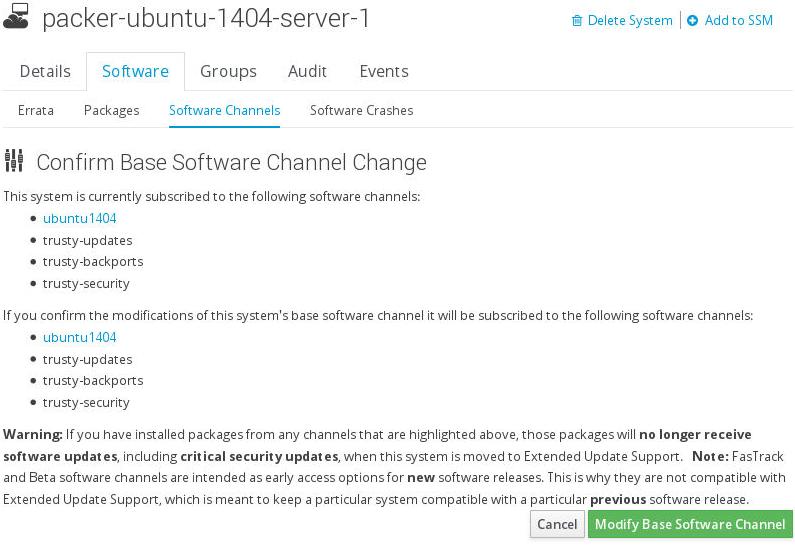
Make sure the subscribed software are listed as following:
Now change the apt configuration of the registed nodes:
# echo 'deb spacewalk://10.9.10.13/XMLRPC channels: trusty-main trusty-updates trusty-backports trusty-security'> /etc/apt/sources.list.d/spacewalk.list
# mv /etc/apt/sources.list /etc/apt/sources.list.bak
# apt-get update
After updating, the repo will be refresed as:
# cat /etc/apt/sources.list.d/spacewalk.list
deb spacewalk://10.9.10.13 channels: main trusty-backports trusty-updates trusty-security
Seems something error happened, syncing the repository, tomorrow will use precise for
verification.
Use Precise
Manually build the package and install the generated packages.
# apt-get install debhelper build-essential gcc devscripts git intltool quilt automake  python-all-dev libnl-route-3-dev asciidoc pkg-config libxml2-utils docbook-xml xsltproc  sgml-data docbook-xsl
# apt-get -f install

# git clone git://anonscm.debian.org/collab-maint/spacewalk/rhnlib.git
# git clone git://anonscm.debian.org/collab-maint/spacewalk/rhn-client-tools.git  rhn-client-tools
# git clone git://anonscm.debian.org/collab-maint/spacewalk/python-ethtool.git  python-ethtool
# git clone git://anonscm.debian.org/collab-maint/spacewalk/rhnsd.git rhnsd
# git clone git://anonscm.debian.org/collab-maint/spacewalk/apt-spacewalk.git

# debuild -i -us -uc -b
# dpkg -i *.deb
# apt-get -f install
Change the code for bug-fix:
--- /usr/lib/python2.7/xmlrpclib.py 2013-05-28 20:44:38.000000000 +0200
+++ new/xmlrpclib.py 2013-05-28 20:44:24.000000000 +0200
@@ -654,8 +654,8 @@
f(self, value, write)

def dump_nil (self, value, write):
- if not self.allow_none:
- raise TypeError, "cannot marshal None unless allow_none is enabled"
+# if not self.allow_none:
+# raise TypeError, "cannot marshal None unless allow_none is enabled"
write("<value><nil/></value>")
dispatch[NoneType] = dump_nil
Register to Server:
# apt-get install python-libxml2
# mkdir /var/lock/subsys
# rhnreg_ks --activationkey=1-precise --serverUrl=http://10.9.10.13/XMLRPC
Use Spacewalk for install the packages:
# cat /etc/apt/sources.list.d/spacewalk.list
deb spacewalk://10.9.10.13 channels: main precise-backports precise-updates precise-security
# mv /etc/apt/sources.list /etc/apt/sources.list.back
# apt-get update
Now your repositories are managed by SpaceWalk.
Upgrade in Client
List all of the channel that you subscribed:
# rhn-channel --list
Check the update and apply them:
# rhn_check
Install Packages in Client
Take install libreoffice for example:
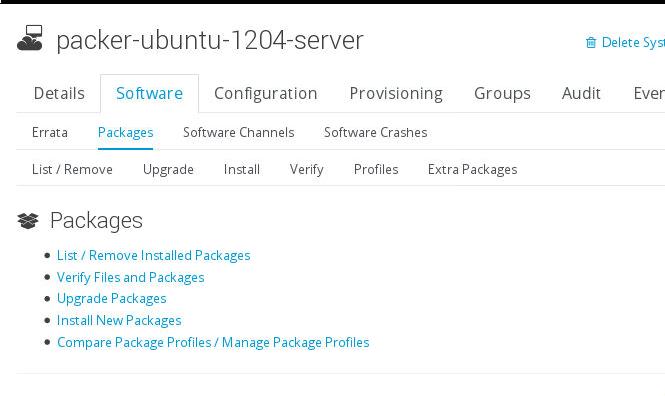
First go to this page and select install new software:
Then search and get the searched result:
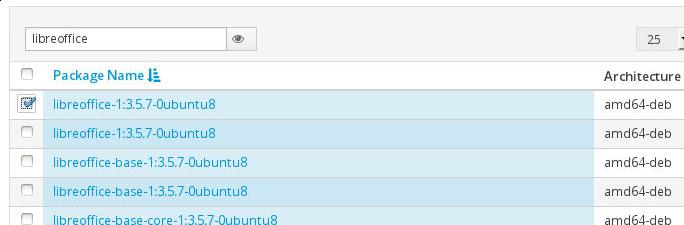
Via rhn_check on client you will really install libreoffice.
Aug 6, 2015
TechnologyInstallation
# mount -t iso9660 -o loop ./ubuntu1404.iso /mnt
# cp -rT /mnt/ iso/
Make a kickstart file use system-config-kickstart, and copy it to:
$ cp ks.cfg ./
$ vim isolinux/langlinux
en
$ vim isolinux/txt.cfg
default install
label install
  menu label ^Install Ubuntu Server
  kernel /install/vmlinuz
  append  file=/cdrom/preseed/ubuntu-server.seed initrd=/install/initrd.gz ks=cdrom:/ks.cfg --
Make ISO
Make the iso.
$ chmod a+w ./iso/isolinux/isolinux.bin
$ mkisofs -J -l -b isolinux/isolinux.bin -no-emul-boot -boot-load-size 4 -boot-info-table -z -iso-level 4 -c isolinux/isolinux.cat -o /material/iso/newiso2.iso -joliet-long ./iso/
Know Issue
umount the partition which has been mounted.
