Jan 26, 2016
TechnologySome Words
VMM: (Virtual Machine Monitor)
VMX: (Virtual Machine eXtensions): instructions on processors with x86 virtualization.
Virtualization software: is most often used to emulate a complete computer system in
order to allow a guest operating system to be run, for example allowing Linux to run as
a guest on top of a PC that is natively running a Microsoft Windows operating system
(or the inverse, running Windows as a guest on Linux).
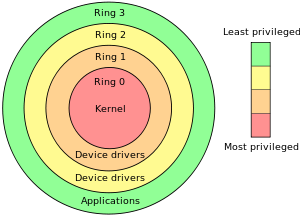
CPU Ring:
https://en.wikipedia.org/wiki/Protection_ring
VT-d, I/O Hardware Virtualization.
VT-c, Networking Hardware Virtualization.
Host kickstart file
Add following installation packages:
%packages
@virtualization
@Base
@Core
@additional-devel
@base
@large-systems
@storage-client-iscsi
@systgem-management-snmp
@virtualization
@virtualization-client
@virtualization-platform
@virtualization-tools
%end
Mouse On Windows Virtual Machine
Add twice the usb mouse:
<input type='tablet' bus='usb'
NUMA
Install the numa configuration tools via:
# apt-cache search numactl
numactl - NUMA scheduling and memory placement tool
# apt-get -y install numactl
Command: numactl --hardware, numastat, numastat -c qemu-kvm.
Check the numa banlancing policy via:
# cat /proc/sys/kernel/numa_balancing
0
echo 1 for open the auto balancing.
KSM, could merge the same memory page, even in different NUMA node.
# cat /sys/kernel/mm/ksm/merge_across_nodes
1
CPU Binding
Use virsh vcpuinfo xx for displaying the VCPU/CPU corresponding relationship.
virsh # emulatorpin 79
emulator: CPU Affinity
----------------------------------
*: 0-7
Change it dynamically:
virsh # emulatorpin 79 0-3 --live
virsh # emulatorpin 79
emulator: CPU Affinity
----------------------------------
*: 0-3
Now you could check the result via virsh dumpxml xxx:
<vcpu placement='static'>4</vcpu>
<cputune>
<emulatorpin cpuset='0-3'/>
</cputune>
1-1 binding using virsh:
# virsh vcpupin 79 0 0
# virsh vcpupin 79 1 1
# virsh vcpupin 79 2 2
# virsh vcpupin 79 3 3
# virsh dumpxml 79 | more
<cputune>
<vcpupin vcpu='0' cpuset='0'/>
<vcpupin vcpu='1' cpuset='1'/>
<vcpupin vcpu='2' cpuset='2'/>
<vcpupin vcpu='3' cpuset='3'/>
Now view the vcpuinfo via:
# virsh vcpuinfo 79
VCPU: 0
CPU: 0
State: running
CPU time: 9.2s
CPU Affinity: y-------
CPU Hot-Plug-in
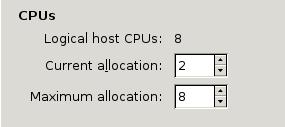
The cpu configuration info is listed as:
View the CPU infos via:
# cat /proc/interrupts
CPU0 CPU1
Change the CPUs to 3:
virsh # setvcpus 80 3 --live
Now in the vm the result should be(or detect it via cat /proc/cpuinfo) :
# cat /proc/interrupts
CPU0 CPU1 CPU2
CPU Working Mode
If we select the pass-through, then the cpuinfo should be:
# virsh dumpxml xxxxx
<cpu mode='host-passthrough'>
</cpu>
# cat /proc/cpuinfo
processor : 1
vendor_id : GenuineIntel
cpu family : 6
model : 58
model name : Intel(R) Core(TM) i7-3770 CPU @ 3.40GHz
If we select the host-model, will choose the most similar:
Or If we choose Copy host cpu mode, like following:
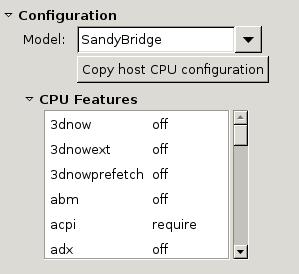
# cat /proc/cpuinfo
....
processor : 1
vendor_id : GenuineIntel
cpu family : 6
model : 42
model name : Intel Xeon E312xx (Sandy Bridge)
Memory Balloon
Change the memory balloon to 1024 or 4096 via:
# virsh qemu-monitor-command PerfTune --hmp --cmd balloon 1024
# virsh qemu-monitor-command PerfTune --hmp --cmd info balloon
balloon: actual=1024
# virsh qemu-monitor-command PerfTune --hmp --cmd balloon 4096
Memory Limitation
Make configuration of the memory via:
virsh memtune PerfTune --hard-limit xxxxx --config
virsh memtune PerfTune --soft-limit xxxxx --config
virsh memtune PerfTune --swap-hard-limit xxxxx --config
virsh memtune PerfTune --min_guarantee xxxxx --config
–config, write to configuration xml
–live, lively write
–current ?
HugePage
Enable hugepage via:
# grep -i huge /proc/meminfo
AnonHugePages: 12820480 kB
HugePages_Total: 0
HugePages_Free: 0
HugePages_Rsvd: 0
HugePages_Surp: 0
Hugepagesize: 2048 kB
Jan 15, 2016
LinuxTips1. Run ansible commands
Run commands in all hosts:
# ansible all -i inventory.ini -m command -u root --args "uptime"
2. mesos introduction
http://www.infoq.com/cn/articles/analyse-mesos-part-02
3. Limit ansible run hosts
# ansible-playbook -i inventory_mesos_cluster changehostname.yml -u root -k
-vvvv --list-hosts
playbook: changehostname.yml
play #1 (master1): host count=1
10.47.58.31
# ansible-playbook -i
inventory_mesos_cluster changehostname.yml -u root -k -vvvv --limit="master1"
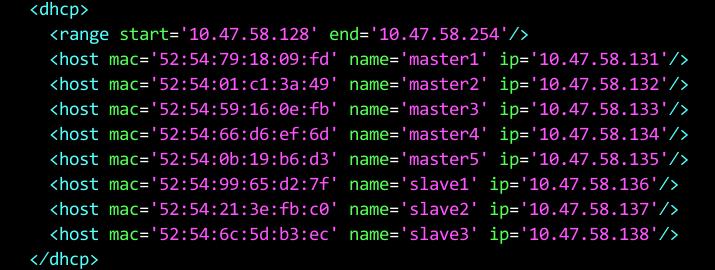
First edit the net configuration:
# virsh net-edit xxxxx
5. Copy items into clipboard in vim
Hit Ctrl+v to visual model, then select the items you want to copy, after select
them, click "*y will copy whatever you selected into your clipbard.
Copy from clipboard—- simply hit p in command mode.
6. mesos.cli
When you meet no module named mesos, install it via pip:
$ pip install mesos.cli
7. Startdict In Command Line
$ sudo apt-get install -y sdcv
$ wget
https://web.archive.org/web/20140917131745/http://abloz.com/huzheng/stardict-dic/dict.org/stardict-dictd_www.dict.org_gcide-2.4.2.tar.bz2
$ sudo mkdir -p /usr/share/stardict/dic/
$ sudo tar xjvf stardict-dictd_www.dict.org_gcide-2.4.2.tar.bz2 -C /usr/share/stardict/dic
8. Golden Dict
Golden Dict.
9. Latest Info On OpenStack
https://mp.weixin.qq.com/s?__biz=MzA3MjkwMDY5OA==&mid=404253985&idx=1&sn=0d6c544dfb129e35bde7d19a0de8887b&scene=1&srcid=01267Etq7arAdYaFqbUG5BNa&pass_ticket=qT7Nk3zsTIegBKqnPTUL%2FTtS%2FMNDH%2F07Fz%2Bfua9RcTwSHVO5OLo5wDpfeb%2FBLCEH#rd
Via following you could get outside world:
ip route del default gw 10.0.2.2 dev enp0s3
ip a del 192.168.10.199/24 dev enp0s8
ip a add 192.168.10.199/16 dev enp0s8
ip route add default via 192.168.0.79 dev enp0s8
11. Change the default gateway On CentOS 7
Default gateway should go here:
$ cat /etc/sysconfig/network
# Created by anaconda
GATEWAY=192.168.0.79
And remove the origin default gateway by adding following definitions :
$ cat /etc/sysconfig/network-scripts/ifcfg-enp0s3
# Generated by dracut initrd
NAME="enp0s3"
DEVICE="enp0s3"
BOOTPROTO=dhcp
# This one is not the default gw
DEFROUTE=no
# Do not override the dns
PEERDNS=no
Thus the default gateway won’t go from enp0s3, but from enp0s8, won’t configure the dns
address to 10.0.x.x.
12. On VPNs
http://linsir.org/post/how_to_install_IPSec_IKEV2_base_on_strongswan_with_CentOS7
https://quericy.me/blog/512
https://quericy.me/blog/699
http://lifehacker.io/post/108814979111/%E5%9C%A8%E6%90%AC%E7%93%A6%E5%B7%A5%E7%9A%84centos7%E4%B8%8B%E6%90%AD%E5%BB%BAstrongswan%E5%AE%9E%E7%8E%B0%E5%9C%A8ios%E4%B8%8A%E6%8C%89%E9%9C%80%E8%BF%9E%E6%8E%A5vpn
https://raymii.org/s/tutorials/IPSEC_vpn_with_CentOS_7.html
https://linux.cn/article-5938-weibo.html
MMC snap-in:
https://technet.microsoft.com/en-us/library/cc722035.aspx
13. Use iptables On CentOS7
Use following steps for disable firewalld and use iptables.
$ systemctl stop firewalld
$ systemctl mask firewalld
$ yum install iptables-services
$ systemctl enable iptables
$ systemctl start iptables
14. Quickly Goes kernel configuration
When you want to configure the newer kernel source tree using your old kernel
configuration, simply do following:
# yes "" | make oldconfig
15. iptables problem
After installing the newest kernel, I cannot use iptables, showing can't initialize iptables : table does not exist.
Solution: compile the modules again, select nat.
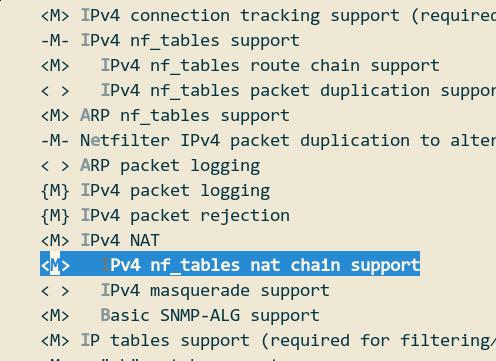
Selecting from:
Networking Support
Network Options
Network packet filtering framework(Netfilter)
IP: Netfilter Configuration
Then you should make modules_install under your kernel source building directory.
16. DistCC For Building Kernel DEB
On configurating distcc:
http://linuxdeveloper.blogspot.tw/2012/03/distributed-kernel-compilation-in.html
On building Linux kernel deb files:
http://www.cyberciti.biz/faq/debian-ubuntu-building-installing-a-custom-linux-kernel/
And:
https://help.ubuntu.com/community/Kernel/Compile
Actual command:
$ time sudo make -j12 CC=distcc
$ sudo MAKEFLAGS="CC=distcc" make-kpkg --rootcmd fakeroot --initrd --append-to-version=-suspend2 kernel-image kernel-headers kernel-source -j16
Really takes long time for building the kernel out, but the iptables won’t works.
dmenu is in the package of suckless-tools.
$ sudo apt-get install suckless-tools
18. Virtio-GPU How-to
https://www.kraxel.org/blog/2015/06/virtio-gpu-on-the-way-upstream/
20. Use Latest Dev Kernel On Fedora
Refers to
http://fedoraproject.org/wiki/Kernel_Vanilla_Repositories
$ curl -s https://repos.fedorapeople.org/repos/thl/kernel-vanilla.repo | sudo tee /etc/yum.repos.d/kernel-vanilla.repo
$ sudo dnf --enablerepo=kernel-vanilla-mainline update
Fall back to the stable one:
$ sudo dnf --enablerepo=kernel-vanilla-stable update
21. Install grub on usb disk/ArchLinux
# chattr -i /boot/grub/i386-pc/core.img
# grub-install --target=i386-pc --recheck --debug --force /dev/sdb
# chattr +i /boot/grub/i386-pc/core.img
22. fcitx-gtk3
Since now firefox using gtk3, so if you want to input chinese in firefox, simply install fcitx-gtk3 then you get fcitx working.
23. Polkit And Virt-manager
Problem:
$ virsh -c qemu:///system
error: failed to connect to the hypervisor
error: authentication failed: no agent is available to authenticate
Add the configuration for the polkit and restart the service:
$ sudo vim /etc/polkit-1/rules.d/49-org.libvirt.unix.manager.rules
polkit.addRule(function(action, subject) {
    if (action.id == "org.libvirt.unix.manage" &&
        subject.isInGroup("kvm")) {
            return polkit.Result.YES;
        }
});
And also you have to add your current user into the group of kvm:
$ sudo usermod -a -G kvm <user name>
Restar the polkit service via:
$ sudo systemctl restart polkit.service
24. Running tasks in byobu
http://superuser.com/questions/623432/transfer-current-command-to-a-detachable-session-tmux-screen
25. GPU Pass-Through
http://www.gitztalk.com/posts/2014/06/30/gaming-in-a-vm/
26. yaourt build error
Reason: gpg checking error, solution is:
$ proxychains4 gpg --recv-key 79BE3E4300411886
27. libvirtd and polkit
Bypass the password prompt:
https://wiki.archlinux.org/index.php/Polkit#Bypass_password_prompt
28. virgl repository
https://www.kraxel.org/repos/
29. pass-through howto
http://vfio.blogspot.com.au/2015/05/vfio-gpu-how-to-series-part-3-host.html
30. Control the USB port power
http://stackoverflow.com/questions/4702216/controlling-a-usb-power-supply-on-off-with-linux
31. On how to reverse usb device
http://www.linuxjournal.com/article/7353?page=0,0
https://www.reddit.com/r/linuxmasterrace/comments/2zveiw/question_about_wine/
32. Set/Unset keyboard LED
Turn on/off the Scroll LED of the keyboard(USB):
xset led 3
xset -led 3
33. USB In a NutShell
http://www.beyondlogic.org/usbnutshell/usb1.shtml
34. Arduino USB Tutorial
http://codeandlife.com/2012/01/22/avr-attiny-usb-tutorial-part-1/
35. Auduino USB Project
https://www.obdev.at/products/vusb/projects.html
36. Detecting mouse events
Using evtest for detecting mouse events:
$ sudo apt-get install evtest
$ sudo evtest
37. SteelSeries Mouse (RAW) DEMO
https://www.youtube.com/watch?v=yvvybR6oyvs
38. USB Device Driver
http://blog.chinaunix.net/uid-20587912-id-2984380.html
http://www.wzona.info/2012/10/usb-duomenu-perdavimas-atmega.html
39. Reverse usb device driver
http://phoeagon.byethost15.com/2012/05/05/%e7%bb%99%e6%9d%82%e7%89%8c%e5%b9%bb%e7%81%af%e7%89%87usb%e9%81%a5%e6%8e%a7%e5%86%99linux%e9%a9%b1%e5%8a%a8-%e4%b8%8a/
http://www.phoronix.com/scan.php?page=news_item&px=MTEzODU
https://bbs.archlinux.org/viewtopic.php?id=187995
https://www.youtube.com/watch?v=GdvmsWnZkyc
https://learn.adafruit.com/hacking-the-kinect/more-kinect-information
https://www.linuxvoice.com/drive-it-yourself-usb-car-6/
Total Phase USB:
http://www.totalphase.com/products/beagle-usb12/
https://github.com/dmage/co2mon
40. v-usb tutorial
http://www.workinprogress.ca/v-usb-tutorial-software-only-usb-for-mega-tiny/
41. v-usb and Arduino
https://www.hackster.io/rayburne/arduino-to-excel-using-v-usb-cbf701
http://www.geek-workshop.com/forum.php?mod=viewthread&tid=8578&highlight=v-usb
http://coopermaa2nd.blogspot.tw/2011/10/v-usb-examples-for-arduino.html
http://www.geek-workshop.com/thread-1137-1-1.html
http://www.geek-workshop.com/forum.php?mod=viewthread&tid=15114&highlight=v-usb
42.Set Timezone of the ArchLinux
Change from UTC to Asia/Shanghai:
$ timedatectl set-timezone Asia/Shanghai
43. Empty all of the bash history
Empty the bash history via:
$ rm -f ~/.bash_history
44. Specify qemu-binary in Packer.io
Edit the json files:
"builders":
[
{
"type": "qemu",
"qemu_binary" : "/usr/libexec/qemu-kvm.sh",
45. apprmor.d
I modified /etc/apparmor.d/abstractions/libvirt-qemu to include the
backing store directory
46. Recover UEFI bootloader
After remove the mainline linux kernel, the archlinux is using the default kernel, but
the UEFI bootloader didn’t notice this, following are the steps for recover the UEFI
bootloader.
grub-install --target=x86_64-efi --efi-directory=/boot/EFI   --bootloader-id=arch_grub --recheck
cat ./EFI/loader/entries/arch.conf
Change the items into initramfs-linux.
If you cannot login to the system, you could start the machine via USB disk or
installation media, using arch-chroot /mnt/ /bin/bash for login to the chroot system,
then do the above operations.
47. bonding
http://sanswers.com/tube/wotC5GZ2FV0/bonding-eth0-and-wlan0-on-arch-linux
48. Fix currpted zsh history
history corrupted.
$ mv .zsh_history .zsh_history_bad
$ strings .zsh_history_bad > .zsh_history
$ fc -R .zsh_history
49. pulp
Using pulp for managing the repositories of RPM/Docker, etc.
50. Chromium flash
Install chromium-pepper-flash in aur.
51. Install xfce4 on CentOS
Install xfce in epel repository via:
# yum --enablerepo=epel -y groups install "Xfce"
52. LED controller
http://www.seeedstudio.com/recipe/402-smart-power-outlet.html
53. Build php envs
https://medium.com/dev-tricks/apache-and-php-on-docker-44faef716150#.c8bguolj0
54. handle docker changes
http://dbaron.org/linux/handle-dock-change.py
55. python detection of usb storage
https://linuxmeerkat.wordpress.com/2014/11/12/python-detection-of-usb-storage-device/
d-feet for debugging of dbus..
Install gvfp-mtp, then you could get your nautillus have the mtp device
support.
Using mtp-detect for detecting the equipments and mtp-connect for
connecting the device.
57. Virtualbox Driver Issue
After upgrading the system, the virtualbox won’t start the machine, this is because we
didn’t install the kernel header, thus the dkms won’t be run after system upgrading.
Install kernel-headers:
$ sudo pacman -S linux-headers
$ sudo /sbin/rcvboxdrv setup
https://linux.cn/article-7072-1.html
59. rvm reinstall issue
openssl load error:
$ rvm pkg install openssl
$ rvm install 2.2.1  --with-openssl-dir=$HOME/.rvm/usr
$ proxychains4 gem update bundler
Then you can continue to use your octopress.
60 Install go on ArchLinux
$ sudo pacman -S go
$ mkdir ~/go
$ vim ~/.zshrc
export GOPATH=~/go
export PATH=$PATH:~/go/bin
61. Packer Development Version
The steps on building packer on Ubuntu:
$ sudo add-apt-repository ppa:ubuntu-lxc/lxd-stable
$ sudo apt-get update
$ sudo apt-get install golang
$ mkdir -p $HOME/Documents/golang
$ export GOPATH=$HOME/Documents/golang
$ export GO15VENDOREXPERIMENT=1
$ export PATH=$PATH:$GOPATH/bin
$ go get github.com/mitchellh/packer
$ cd $GOPATH/src/github.com/mitchellh/packer
$ sudo chown -R dash /home/dash/
$ make
bitnami
62. Install add-apt-repository command
add-apt-repository missing:
$ sudo apt-get install software-properties-common
For checkout specified tag:
$ git tag -l
.....
.....
xxyy
$ git checkout tags/xxyy -b xxyy_local
64. Nested kvm On ArchLinux
Enable the nested kvm for ArchLinux via following steps:
➜  ~ systool -m kvm_intel -v | grep nested
    nested              = "N"
➜  ~ modprobe -r kvm_intel
modprobe: ERROR: could not remove 'kvm_intel': Operation not permitted
➜  ~ sudo modprobe -r kvm_intel
➜  ~ sudo modprobe kvm_intel nested=1
➜  ~ sudo vim /etc/modprobe.d/modprobe.conf
options kvm_intel nested=1
➜  ~ systool -m kvm_intel -v | grep nested
    nested              = "Y"
65. Failed to build rubygem
Issue:
Unable to install gem - Failed to build gem native extension - cannot load
such file — mkmf (LoadError)
Solved by: sudo apt-get install -y ruby-dev.
Loation for finding xe-tools:
# pwd
/opt/xensource/packages/iso
# ls
XenCenter.iso  xs-tools-6.5.0-20001.iso  xs-tools-6.5.0.iso
67. Qemu Tunnel Types
http://linuxsimba.com/qemu-tunnel-types/
68. zsh history
Error message is zsh: corrupt history file /home/myusername/.zsh_history.
Solved by:
➜  ~ mv .zsh_history .zsh_history_bad
➜  ~ strings .zsh_history_bad > .zsh_history
➜  ~ fc -R .zsh_history
69. virsh priviledge In Ubuntu
When met following issue, solved via add current user to libvirtd and kvm, relogin
again then issue would be solved:
Error while connecting to libvirt: Error making a connection to libvirt URI
qemu:///system?no_verify=1&keyfile=/home/dash/.ssh/id_rsa:
Call to virConnectOpen failed: Failed to connect socket to
'/var/run/libvirt/libvirt-sock': Permission denied
Solution :
$ sudo usermod -a -G kvm dash
$ sudo usermod -a -G libvirtd dash
70. Vagrant ext vars
http://stackoverflow.com/questions/23008367/ansible-with-vagrant-read-inventory-from-vagrantfile-extra-vars
71. rootpasswd in Kickstart
Formats, and to generate the encrypted format.
rootpw "password here"
rootpw --iscrypted password_hash
$ openssl passwd -1 "password here"
72. On Vagrant Xenserver
To build Xenserver vagrant box in packer:
https://github.com/imduffy15/packer-xenserver
Possible usable vagrant box(For Xenserver):
https://vagrantcloud.com/duffy/boxes/xenserver
Remote provisioning to a xenserver hypervisor:
http://serverfault.com/questions/631837/remote-automated-provisioning-to-a-xenserver-hypervisor
Ansible and Xen:
http://sharknet.us/2013/12/13/276/
Vagrant and XenServer:
https://github.com/jonludlam/vagrant-xenserver
73. Tips on Xenserver In Vagrant
Mac address:
# vim /etc/sysconfig/network-scripts/interface-rename-data/static-rules.conf
eth0:mac = "xxxxxxxxx"
# interface-rename --dry-run --reset-to-install
Then you could reset all of your configuration into the initial status.
74. oh-my-vagrant
https://github.com/purpleidea/oh-my-vagrant
75. Detect System
http://unix.stackexchange.com/questions/89714/easy-way-to-determine-virtualization-technology
Use dmidecode.
76. git remove untracked files
Following commands will remove the untracked files in .gitignore.
$  git rm --cached .vagrant
$  git rm --cached -r .vagrant
$  git rm -r --cached .
$  git add .
$  git commit -m "Added with gitignored"
$  git push origin master
77. node mcu good example
http://bbs.nodemcu.com/t/nodemcu/1147
78. 8723ae issue
Do following to make the rtl8723awe working more effeciently.
$ vim  /etc/modprobe.d/rtl8723ae.conf
options rtl8723ae fwlps=0
79. PDF Chinese
Poppler-data will enable chinese support.
$ sudo pacman -S poppler-data
80. Join multiple lines with comma
abc.txt should remove the end enter and replaced with comma.
$ cat abc.txt | tr '\n' ','
Refers to:
http://blog.irreverence.co.uk/?p=209
81. Shrink vhd file
In XenServer vms:
$ cat /dev/zero > zero.dat ; sync ; sleep 1 ; sync ; rm zero.dat
82. VHD File Compact
shirinking the vhd file via:
$ VBoxManage clonehd target.vhd cloned.vhd
$ VBoxManage modifyhd cloned.vhd --compact
83. 1602 And RPI
http://www.raspberrypi-spy.co.uk/2015/05/using-an-i2c-enabled-lcd-screen-with-the-raspberry-pi/
http://raspberrypi.stackexchange.com/questions/28991/how-can-i-use-a-lcd-display-with-a-i2c-adapter
84. CPU Frequency
Install and enable the service of cpupower via:
$ sudo pacman -S cpupower
$ sudo systemctl enable cpupower.service
$ sudo systemctl start cpupower.service
configure the cpupower parameters via:
$  cat /etc/default/cpupower
# Define CPUs governor
# valid governors: ondemand, performance, powersave, conservative, userspace.
governor='performance'
Some useful commands should be like:
$ sudo cpupower frequency-set -f  3.06
$ cpupower frequency-info
$ watch grep \"cpu MHz\" /proc/cpuinfo
85. Gmail Mutt
https://www.linux.com/community/blogs/133-general-linux/850945-setup-mutt-with-gmail-on-centos-and-ubuntu
86. Fake Video
http://www.atechnote.com/2014/11/create-fake-webcam.html
https://developer.ubuntu.com/en/snappy/start/
87. Way Of Snappy Extend
http://askubuntu.com/questions/577105/is-there-a-way-to-add-repo-to-snappy-ubuntu-core
88. pl2802 driver
You probably have a counterfeit adapter. It won’t work with the updated driver. You
need to find the 3.2.0.0 driver and use it instead. You can find it here
http://www.miklor.com/COM/UV_Drivers.php
83. collectd On ArchLinux
Install collectd via:
$ sudo pacman -S rrdtool net-snmp liboping collectd
84. gem path
Use gem env for detecting the system variables, some variables should be added into
system path.
85. Vagrant and packer.io
http://boxupp.com/
http://phansible.com/
https://puphpet.com/#
getprotobox.com/
http://www.sitepoint.com/5-easy-ways-getting-started-php-vagrant/
http://rove.io/
86 Install latest ansible
Install the latest ansible on Ubuntu:
$ sudo apt-get update
$ sudo apt-get install software-properties-common
$ sudo apt-add-repository ppa:ansible/ansible
87. Packer And Ansible
http://www.jeffgeerling.com/blog/server-vm-images-ansible-and-packer
88. Vagrant issue
Problem is:
sudo vagrant up
Bringing machine 'tunirserver' up with 'libvirt' provider...
/usr/share/gems/gems/fog-1.23.0/lib/fog/libvirt/requests/compute/list_volumes.rb:32:in `info': Call to virStorageVolGetInfo failed: Storage volume not found: no storage vol with matching path '/tmp/orbit-kdas' (Libvirt::RetrieveError)
Solved by:
$  sudo virsh pool-list
 Name                 State      Autostart
-------------------------------------------
 default              active     yes
 tmp                  active     yes
Then refreshing each pool manually.

$  sudo virsh pool-refresh tmp
Pool tmp refreshed
$  sudo virsh pool-refresh default
Pool default refreshed
89. apicv tips.
View and modify the parameters.
options kvm_intel nested=1
options kvm_intel enable_shadow_vmcs=1
options kvm_intel enable_apicv=1
options kvm_intel ept=1

By setting enable_apicv=0 the messages are gone
cat /sys/module/kvm_intel/parameters/enable_apicv
N
90. Disable apic in XenServer
http://discussions.citrix.com/topic/350144-xen62-turn-off-acpi-without-grubconfmenulst/
if you look into the /boot/extlinux.conf the safe mode uses acpi=off params  as

label safe
  # XenServer in Safe Mode
  kernel mboot.c32
  append /boot/xen.gz nosmp noreboot noirqbalance acpi=off noapic mem=1024G dom0_max_vcpus=4 dom0_mem=752M,max:752M com1=115200,8n1 console=com1,vga --- /boot/vmlinuz-2.6-xen nousb root=LABEL=root-fxfyhkuc ro console=tty0 xencons=hvc console=hvc0 --- /boot/initrd-2.6-xen.img
91. Quickly devstack
Clone the repository from:
git clone http://github.com/openstack-dev/devstack
cd devstack/
Edit localrc via:
For Git Clone

 git clone http://git.trystack.cn/openstack/nova.git

For DevStack

Add GIT_BASE, NOVNC_REPO and SPICE_REPO variables to local.conf file.

[[local|localrc]]

# use TryStack git mirror
GIT_BASE=http://git.trystack.cn
NOVNC_REPO=http://git.trystack.cn/kanaka/noVNC.git
SPICE_REPO=http://git.trystack.cn/git/spice/spice-html5.git
Here you could go on with devstack.sh
92. find and replace string in one directory
Be sure to use /bin/bash without any colors.
grep -rli '192.168.1.69' | xargs -i@ sed -i 's/192.168.1.69/192.168.0.121:8080/g' @
93. Two IDES
Startup the cloud9 and eclise-orion via:
$ sudo docker run -it -d -p 8888:80 kdelfour/cloud9-docker
$ sudo docker run -it -d -p 8889:8080 fabric8/eclipse-orion
94. RaspberryPI And WebTop
http://www.instructables.com/id/Raspberry-PI-Motorola-Lapdock/step7/References/
95. npm china
Use following command for using cnpm for replacing the npm:
$ npm install -g cnpm --registry=https://registry.npm.taobao.org
96. Opera Vimemperator issue
1) Install opera extension which allows you to install Google Chrome Web Store
extensions -
https://addons.opera.com/en/extensions/details/download-chrome-extension-9/

2) Install the Vimium extension at
https://chrome.google.com/webstore/detail/vimium/dbepggeogbaibhgnhhndojpepiihcmeb?hl=en

You now have a a great looking Vimium extension working in Opera.
97. OpenStack Issue
http://kingsoo1983.github.io/blog/2016/04/14/about-openstack/
For using devstack:
$cd devstack/
$source openrc admin admin # for admin rights
or
$source openrc demo demo # for demo user
98. tcpdump no buffer
with tcpdump -l, tcpdump will show real-time.
99. Detach runnning process
http://superuser.com/questions/732503/redirect-stdout-stderr-of-a-background-job-from-console-to-a-log-file
100. Mirantis Issue
https://docs.mirantis.com/openstack/fuel/fuel-master/reference-architecture.html#fuel-repository-mirroring