Apr 22, 2016
TechnologyFor I want to do some configuration workings on old distribution of CentOS, I have to
use lots of materials which from vault.centos.com, following are the steps for syncing
them.
First, rsync in vault.centos.com is closed, thus we have to choose
http://archive.kernel.org/centos/.
Rsync Scripts
Refers to:
https://www.totalnetsolutions.net/2013/10/02/setting-up-a-corporate-yum-repository-mirror-for-bandwidth-and-staged-update-management/
Make Repository
https://wiki.centos.org/HowTos/CreateLocalMirror
Apr 21, 2016
TechnologyBackground
Since the monitor in my company are so ba……..d, I have to change my working
environment from PC to SurfacePro, thus I have some tools changes, following are the
records.
Terminal: XShell4, Make sure you have change the screen-size issue.
purplepalmdash.github.io/blog/2015/11/13/win10-tips-for-using-xshell/
Screen-Shot:
I use picPick for replacing the scrot, the scrot is so convenient thus I found many
tools for replacing it.
picPick Configuration: the main purpose is for selecting the rectangle and save it
automatically to the folder with the timestamp.
Auto-Syncing tool:
using WinSCP’s keep remote the latest status:
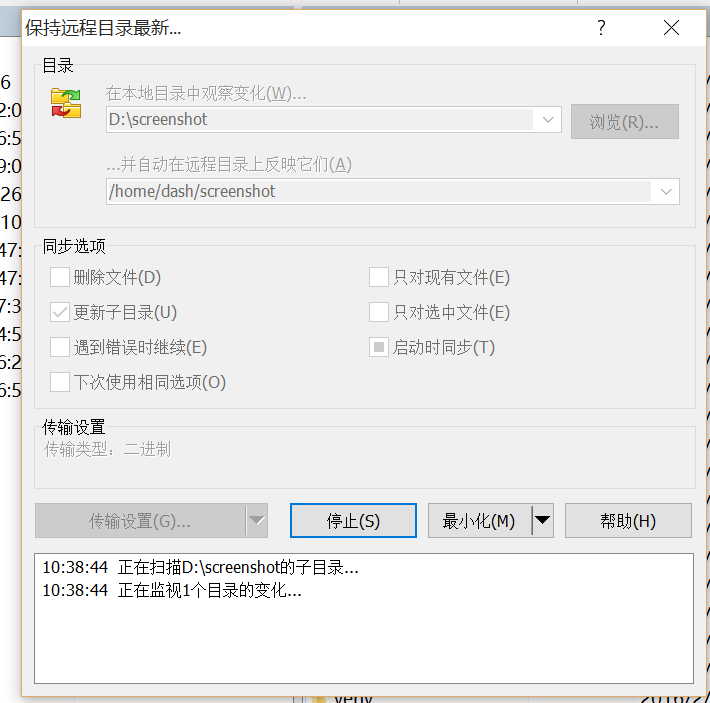
OK, Now we could also using the same writing behavior just as under Linux Awesome
Desktop.
Apr 20, 2016
TechnologySteps
Install steps are listed as following:
First as root user, create the initial stack user via:
# git clone https://git.openstack.org/openstack-dev/devstack
# tools/create-stack-user.sh
# passwd stack
Now login with user stack, clone the repository and begin devstack installation:
$ git clone https://git.openstack.org/openstack-dev/devstack
$ cd devstack
$ git checkout stable/liberty
$ cp samples/local.conf ./
$ vim local.conf
The local.conf file should added following items:
# use TryStack git mirror
GIT_BASE=http://git.trystack.cn
NOVNC_REPO=http://git.trystack.cn/kanaka/noVNC.git
SPICE_REPO=http://git.trystack.cn/git/spice/spice-html5.git
Add following configurations:
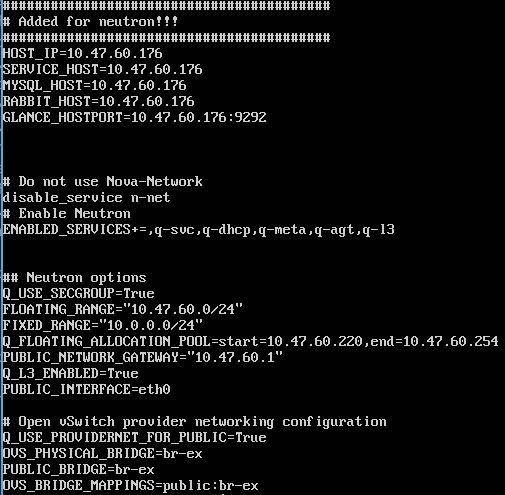
Now stacking the devstack:
$ ./stack.sh
Apr 18, 2016
TechnologyTips
After changing the IP Address of the DevStack machine, do following for re-installing
the envs:
$ ssh stack@Your_IP
stack@packer-PerforceTest:~$ pwd
/opt/stack
stack@packer-PerforceTest:~$ cd devstack/
stack@packer-PerforceTest:~/devstack$ ./unstack.sh && ./stack.sh
Now visiting your http://Your_New_IP/dashboard you will got the openstack dashborad.
Apr 15, 2016
TechnologySince the root partition is not so large, I have to change the default position of the
docker repository, following are the steps:
Make a Soft Link
Make a soft link to the docker repository via:
$ sudo mkdir DockerRepo
$ sudo chown -R dash:dash DockerRepo
$ sudo chmod  777 -R DockerRepo
$ sudo tar -zcC /var/lib docker > /home/juju/DockerRepo/var_lib_docker-backup-$(date +%s).tar.gz
$ ls -l -h /home/juju/DockerRepo
$ sudo mv /var/lib/docker /home/juju/DockerRepo/
$ sudo ln -s /home/juju/DockerRepo/docker /var/lib/docker
$ sudo service docker restart
$ sudo service docker status
Notice: the tar -zcC will take a long time, be patient.
In systemd like system, you should firstly stop docker.service, after moving,
restarting the docker.service.
Change Docker Parameters
Ubuntu/Debian: edit your /etc/default/docker file with the -g option: DOCKER_OPTS="-dns 8.8.8.8 -dns 8.8.4.4 -g /mnt"
