Oct 9, 2016
LinuxTips1. Working tips for remove dulipcate chars
http://codereview.stackexchange.com/questions/5441/removing-any-duplicate-characters-in-a-string
2. pip reinstallation
Uninstall all of the pip installed packages:
# pip freeze | xargs pip uninstall -y
3. ipython notebook
Install on ArchLinux via:
$ sudo pip install "ipython[all]"
Be sure to make your internet connection stable.
Run it via:
$ ipython notebook
ipython2 installation issue:
$ python2 -m pip install ipykernel
$ python2 -m ipykernel install --user
$ python2 -m pip install "ipython[all]"
$ ipython3 notebook
Now you could create python2&python3 notebooks.
4. wkhtmltoimage
wkhtmltoimage could convert webpage into image files, like following command:
$ wkhtmltoimage http://purplepalmdash.github.io dash.jpg
5. Synergyc
Add following into ~/.config/awesome/rc.lua, then you could let synergyc auto-login
into another server:
"synergyc 192.168.0.219",
6. vromerc
vromerc configuration:
set userletters=0
7. Docker Registry
https://www.digitalocean.com/community/tutorials/how-to-set-up-a-private-docker-registry-on-ubuntu-14-04
8. Trouble-Shooting In Libvirt
After installing archlinux, the virsh list will be failed with following message:
[root@Arch8G ~]# virsh list
error: failed to connect to the hypervisor
error: Failed to connect socket to '/var/run/libvirt/libvirt-sock': No such file or
directory
Solved via:
# systemctl enable libvirtd.service
# systemctl enable virtlogd.service
# systemctl restart libvirtd.service
# systemctl restart virtlogd.service
Now virsh list will be OK.
For user, you should add polkit related items, see:
https://wiki.archlinux.org/index.php/Libvirt#Using_polkit
also remember add yourself into the group kvm.
$ sudo usermod -a -G kvm dash
$ sudo usermod -a -G libvirtd dash
9. Docker using daocloud registry
Edit following file(Or you could edit it via: sudo systemctl edit docker.service):
# vim /etc/systemd/system/docker.service.d/override.conf
[Service]
ExecStart=
ExecStart=/usr/bin/dockerd --registry-mirror=http://1a653205.m.daocloud.io -H fd://
Now reload the service and restart docker.service via:
# systemctl daemon-reload
# systemctl restart docker.service
Now your docker pulling will from the daocloud website.
10. DEB Local Repository How-TO
In a ubuntu system, generate package repository metadatas:
# sudo apt-get install -y dpkg-dev
# dpkg-scanpackages . /dev/null | gzip -9c > Packages.gz
Now copy the directory into a webserver, like in 192.168.177.11, visit your
webpage, you will see http://192.168.177.11/xxxx contains all of the
packages and their metadata.
In the systems which you want to use this repository, do following:
$ sudo vim /etc/apt/sources.list.d/docker.list
deb http://192.168.177.11/ubuntu1604dockerrepo/	/
$ sudo apt-get update
Now examine the package docker-engine which in the private repository:
# apt-cache policy docker-engine
docker-engine:
  Installed: 1.12.3-0~xenial
  Candidate: 1.12.3-0~xenial
  Version table:
 *** 1.12.3-0~xenial 500
        500 http://192.168.177.11/ubuntu1604dockerrepo  Packages
        100 /var/lib/dpkg/status
Install this package via:
$ sudo apt-get install -y docker-engine --allow-unauthenticated
11. vagrant initial scripts for setting docker
Create the initial.sh under the vagrant folder:
# Use apt-cacher server
echo 'Acquire::http::Proxy "http://192.168.177.11:3142";'>/etc/apt/apt.conf.d/01proxy
# Added the primary repository
echo 'deb http://192.168.177.11/ubuntu1604dockerrepo/    /'>/etc/apt/sources.list.d/dockerrepo.list
apt-get update
apt-get -y install vim
apt-get install -y docker-engine --allow-unauthenticated
Using local docker registry:
# Use apt-cacher server
echo 'Acquire::http::Proxy
"http://192.168.177.11:3142";'>/etc/apt/apt.conf.d/01proxy
# Added the primary repository
echo 'deb http://192.168.177.11/ubuntu1604dockerrepo/
/'>/etc/apt/sources.list.d/dockerrepo.list
apt-get update
apt-get -y install vim
apt-get install -y docker-engine --allow-unauthenticated
# Added local docker registry
sed -i 's#fd://#fd:// --registry-mirror http://192.168.177.11:5000
--insecure-registry 192.168.177.11:5000#' /lib/systemd/system/docker.service
systemctl daemon-reload
systemctl restart docker
12. nginx docker way
Run via:
$ sudo docker run --name docker-nginx -p 80:80 -d -v ~/serve:/usr/share/nginx/html
nginx
With auto-index:
$ sudo docker run --name docker-nginx -p 80:80 -d -v ~/serve:/usr/share/nginx/html jrelva/nginx-autoindex
13. Combine Pictures
fotowall could genrate photo wall:
$ yaourt -S fotowall
Hugin could generate full-view pictures.
$ sudo pacman -S hugin
14. Docker Swarm How-to
http://www.lxy520.net/2016/07/02/shi-yong-docker-1-12-da-jian-duo-zhu-ji-docker-swarmji-qun/
https://www.linux.com/learn/how-use-docker-machine-create-swarm-cluster
15. Linux 性能监控专题
https://linux.cn/topic-linux-system-performance-monitoring.html
16. docker-compose in swarm
Install experimental version via:
## 测试版
curl -sSL http://acs-public-mirror.oss-cn-hangzhou.aliyuncs.com/docker-engine/test/internet | sh
curl -sSL http://acs-public-mirror.oss-cn-hangzhou.aliyuncs.com/docker-engine/test/intranet | sh

## 实验版
curl -sSL http://acs-public-mirror.oss-cn-hangzhou.aliyuncs.com/docker-engine/experimental/internet | sh
curl -sSL http://acs-public-mirror.oss-cn-hangzhou.aliyuncs.com/docker-engine/experimental/intranet | sh
https://docs.docker.com/compose/swarm/
17. kubernetes
https://coreos.com/kubernetes/docs/latest/kubernetes-on-vagrant.html
http://andrewmichaelsmith.com/2016/05/my-kubernetes-setup/
http://www.codeceo.com/article/kubernetes-guide.html
18. Changing disks
After changing disk(switch them) in archlinux, the efi menu should be
rewritten into:
$ sudo cat /boot/loader/entries/arch.conf
title	ArchLinux
linux	/vmlinuz-linux
initrd	/initramfs-linux.img
options	root=/dev/sdb2 rw
Becareful of root=/dev/sda2 changing to root=/dev/sdb2.
17. Vagrant IP Setting
If your vagrant’s ip address won’t set properly, for example, eth1’s
configuration is added into eth0, then you should install the following
package:
$ sudo pacman -S community/virtualbox-guest-utils
18. badblocks checking in ArchLinux
Check the sda5 and sda3 of the disk via:
$ sudo badblocks -v /dev/sda5>badsectors5.txt && sudo badblocks -v
/dev/sda3>badsectors3.txt
smartmontools for checking disk healthy:
$ sudo pacman -S smartmontools
$ sudo smartctl -s on /dev/sda
$ sudo smartctl -H /dev/sda1
$ sudo smartctl -H /dev/sda
19. Manually build wordpress
https://www.sitepoint.com/how-to-manually-build-docker-containers-for-wordpress/
20. XenServer Get rrd data
Write a py file on XenServer, and run it:
import pprint, time, sys, os
import XenAPI
session = XenAPI.xapi_local()
session.xenapi.login_with_password("root", "xxxxx")
session_id=session._session
print session_id
wget_rrd_url="wget http://%s/host_rrd\?session_id\=%s" %("192.168.10.187", session._session)
print wget_rrd_url
os.system(wget_rrd_url)
session.logout()
21. Xen In Ubuntu
In ubuntu16.04, use xen hypervisor:
$ sudo apt-get update && sudo apt-get upgrade -y && sudo apt-get dist-upgrade -y
$ sudo apt-get install -y xen-hypervisor-amd64
$ sudo apt-get install -y virtinst virt-manager
Edit the grub for enabling the xen hypervisor:
$ sudo vim /etc/default/grub
GRUB_CMDLINE_LINUX_DEFAULT="Xen 4.1-amd64"
GRUB_CMDLINE_XEN="dom0_mem=1024M,max:1024M dom0_max_vcpus=2"
$ sudo update-grub
$ sudo reboot
Examine the usage:
$ sudo xl list
Name                                        ID   Mem VCPUs	State	Time(s)
Domain-0                                     0  1024     2     r-----      28.7
22. pv or hvm
Decided via:
$ sudo xl list --long CentOS69
Examine the result of the output:
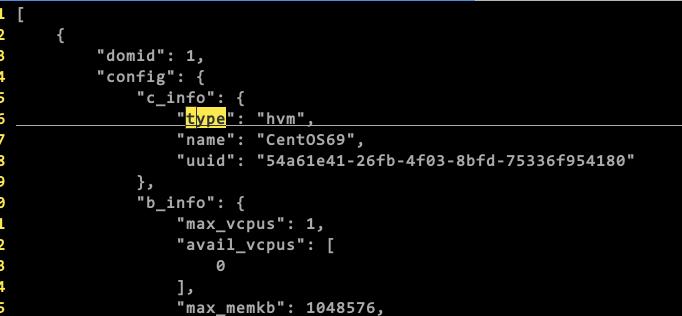
in our example, this machine is hvm, not pv.
23. vboxsf
Problem:
sudo mount -t vboxsf Shared_Folder ~/SF/
Gave following result:
VirtualBox: mount.vboxsf: mounting failed with the error: No such device
The solution for me was to stop vboxadd and do a setup after that:
cd /opt/VBoxGuestAdditions-*/init
sudo ./vboxadd setup
Then, you could also modprobe following:
$ sudo modprobe -a vboxguest vboxsf
$ sudo mount -t vboxsf -o uid=1000,gid=1000 vagrant /vagrant
Case you build failed, try following:
$ sudo yum install kernel-devel gcc
$ echo export KERN_DIR=/usr/src/kernels/`uname -r` >> ~/.bashrc
$ source ~/.bashrc     # to set the variable in your current shell
$ sudo echo $KERN_DIR  # verify the value is set
$ sudo ls $KERN_DIR    # verify the directory exists
24. purge xen
For switching back to default linux kernel rather than xen hypervisor, do
following:
$ sudo apt-get purge xen*
$ sudo vim /etc/default/grub
// remove all of the xen related
$ sudo reboot
25. lvextend
extend to all of the usable space:
$ sudo lvextend -l +100%FREE /dev/vgonsda/lvubuntu
$ sudo resize2fs /dev/vgonsda/lvubuntu
In my situation this extend the root partition from 50G to 250G(all of the
disk size)
26. ArchLinux Screen Brightness
Examine the brightness in sys folder:
# ls /sys/class/backlight
acpi_video0  intel_backlight
In our case is intel_backlight, thus we go into this folder and view its
parameters:
# ls /sys/class/backlight/intel_backlight
actual_brightness  bl_power  brightness  device  max_brightness  power
subsystem  type  uevent
# cat /sys/class/backlight/intel_backlight/max_brightness
648
# cat /sys/class/backlight/intel_backlight/brightness
643
It’s too bright, so we low down its value via:
# tee /sys/class/backlight/intel_backlight/brightness <<< 400
400
or we could set it via xbacklight:
# xbacklight -set 50
# xbacklight -set 100 ### Set to 100% brightness.
27. One-click startup
https://item.jd.com/10398791583.html
28. CloudStack HA
http://severalnines.com/blog/how-deploy-high-availability-cloudstackcloudplatform-mariadb-galera-cluster
29. Get total memory of XenServer
Command:
$  xl info | grep total_memory
total_memory           : 7805
30. apt-fast
Install apt-fast for fetching back packages:
sudo add-apt-repository ppa:saiarcot895/myppa
sudo apt-get update
sudo apt-get -y install apt-fast
31. qemu bridge issue
Error message:
$ virsh start xcenter-win7
error: Failed to start domain xcenter-win7
error: internal error: /usr/lib/qemu/qemu-bridge-helper --use-vnet --br=br0
--fd=25: failed to communicate with bridge helper: Transport endpoint is not
connected
stderr=failed to parse default acl file `/etc/qemu/bridge.conf'
Solved via:
$ sudo mkdir -p /etc/qemu
$ sudo echo "allow br0">/etc/qemu/bridge.conf
Then you could use the qemu.
32. purge packages in archlinux
The command is:
$ sudo pacman -Rsn vagrant
This will remove all of the vagrant and its related packages.
33. dd for rescue disk
command:
$ sudo dd bs=262144 if=/dev/hda /dev/hdb conv=noerror,sync bs=10M status=progress
34. Download images automatically
Do following:
until sudo docker pull mesoscloud/zookeeper:3.4.6-ubuntu-14.04
do
	echo "fucku"
done

until sudo docker pull mesoscloud/mesos-master:0.24.1-ubuntu-14.04
do
	echo "fucku1"
done

until sudo docker pull mesoscloud/mesos-slave:0.24.1-ubuntu-14.04
do
	echo "fucku2"
done
until sudo docker pull mesosphere/marathon:v0.15.0
do
	echo "fuck U"
done
sudo docker save mesosphere/marathon:v0.15.0 | bzip2>marathon.tar.bz2
sudo docker save mesoscloud/mesos-slave:0.24.1-ubuntu-14.04| bzip2>slave.tar.bz2
sudo docker pull mesoscloud/zookeeper:3.4.6-ubuntu-14.04|bzip2>zookeeper.tar.bz2
sudo docker pull mesoscloud/mesos-master:0.24.1-ubuntu-14.04|bzip2>master.tar.bz2
35. Monitoring Docker
For monitoring docker host, containers, monitoring systems, and form the alert
system.
https://stefanprodan.com/2016/a-monitoring-solution-for-docker-hosts-containers-and-containerized-services/
36. Stop Docker-compose
Via sudo docker-compose down, then you will get all of the docker-compose
uped container down.
37. tsocks
Install:
$ sudo apt-get install tsocks
Configure:
$ sudo vim /etc/tsocks.conf
local = 192.168.1.0/255.255.255.0
#local表示本地的网络,也就是不使用socks代理的网络
local = 127.0.0.0/255.0.0.0
server = 127.0.0.1   #socks服务器的IP
server_type = 5  #socks服务版本
server_port = 8888  #socks服务使用的端口
38. vimdiff
Use dp or do for copying left to right or copy right to left.
39. Docker to Rocket
Tranform images via:
https://github.com/appc/docker2aci
$ docker save -o ubuntu.docker ubuntu
$ docker2aci ubuntu.docker
Extracting 706766fe1019
Extracting a62a42e77c9c
Extracting 2c014f14d3d9
Extracting b7cf8f0d9e82

Generated ACI(s):
ubuntu-latest.aci
$ actool --debug validate ubuntu-latest.aci
ubuntu-latest.aci: valid app container image
40. Detect display
Install lshw via:
$ sudo pacman -S lshw
$ sudo lshw -C display
$ sudo lshw -C display
41. Change Nomachine resolution
Detect all of the resolution configuration:
# xrandr -q
Now you get all of the resolution configuraitons. Change the current fb via:
$ xrandr --fb 1920x1080
42. Grafana collectd template
https://grafana.net/dashboards/203
Then manually replace all of the datasource segment:
For example: "datasource": "79's Graphite",.
43. at command
For do tasks in specified time:
# at 10PM
warning: commands will be executed using /bin/sh
at> cd /home/juju/http; axel
http://mirrors.aliyun.com/centos/7.3.1611/isos/x86_64/CentOS-7-x86_64-Everything-1611.iso
at> <EOT>
job 2 at Tue Dec 20 22:00:00 2016
Then this at will automatically download the centos7.3 iso in 10:00PM.
44. Run squid in docker
https://hub.docker.com/r/sameersbn/squid/
45. rkt image fetch
Command:
$ rkt fetch --insecure-options=image coreos-hyperkube-v1.4.6_coreos.0.aci
image: using image from file coreos-hyperkube-v1.4.6_coreos.0.aci
sha512-114e15d31926a6b185f658bc5c522fee
core@coreos1 ~ $ rkt image list
ID			NAME						SIZE
IMPORT TIME	LAST USED
sha512-114e15d31926	quay.io/coreos/hyperkube:v1.4.6_coreos.0	637MiB
1 minute ago	1 minute ago
46. Linux Installation Date
Via:
ls -alct /root
47. Daocloud speedup in ubuntu14.04
Edit following file:
$ sudo vim /etc/default/docker
DOCKER_OPTS="$DOCKER_OPTS --registry-mirror=http://1a653205.m.daocloud.io"
$ sudo service docker restart
48. hugo error
When meeting following issue:
hugo
Started building sites ...
ERROR: 2017/01/03 12:02:00 general.go:241: .Page's RSSlink is deprecated and
will be removed in Hugo 0.2. Use RSSLink instead
Solution will be:
$ grep -i "rsslink" ./ -r
./themes/hyde-a/layouts/partials/sidebar.html:      {{ if .Site.Params.rss
}}<a href="{{ .RSSlink }}" type="application/rss+xml"><i class="fa
fa-rss-square fa-3x"></i></a>{{ end }}
Replace all of the RSSlink with RSSLinke.
49. Start VirtualBox Vms
Start k8s cluster via one command:
$ VBoxManage list vms
$ VBoxManage startvm "k8s_coreos1" --type headless
$ VBoxManage startvm "k8s_coreos2" --type headless
$ VBoxManage startvm "k8s_coreos3" --type headless
50. ip namespace
Some operation tips:
# ip netns add testns
# ip netns exec testns ip addr
# ip netns exec testns ifconfig -a
# ip netns exec testns bash
# ip netns list
# ip netns delete testns
# ip netns list
# pacman -S ethtool
# ethtool -k br0 | grep netns
51. ip links
Create a Veth pair:
# ip link add veth0 type veth peer name veth1
Examine the result:
# ip link show
24: veth1@veth0: <BROADCAST,MULTICAST,M-DOWN> mtu 1500 qdisc noop state DOWN
mode DEFAULT group default qlen 1000
    link/ether 02:ec:bd:78:59:06 brd ff:ff:ff:ff:ff:ff
25: veth0@veth1: <BROADCAST,MULTICAST,M-DOWN> mtu 1500 qdisc noop state DOWN
mode DEFAULT group default qlen 1000
    link/ether 5a:a6:f5:88:27:9f brd ff:ff:ff:ff:ff:ff
Could it be transfered?
[root@DashSSD ~]# ethtool -k veth0 | grep netns
netns-local: off [fixed]
[root@DashSSD ~]# ethtool -k veth1 | grep netns
netns-local: off [fixed]
We could view Veth as a 2-wired, so we first add one port to a namespace:
# ip netns add netns1
# ip link set veth1 netns netns1
# ip link show
via ip link show we found the veth1 vanished.
And we could view the namespace owned link equips via:
# ip netns exec netns1 ip link show
1: lo: <LOOPBACK> mtu 65536 qdisc noop state DOWN mode DEFAULT group default
qlen 1
    link/loopback 00:00:00:00:00:00 brd 00:00:00:00:00:00
24: veth1@if25: <BROADCAST,MULTICAST> mtu 1500 qdisc noop state DOWN mode
DEFAULT group default qlen 1000
    link/ether 02:ec:bd:78:59:06 brd ff:ff:ff:ff:ff:ff link-netnsid 0
Add veth1 ip address:
# ip netns exec netns1 ip addr add 10.1.1.1/24 dev veth1
Add veth0 ip address:
# ip addr add 10.1.1.2/24 dev veth0
Now startup the equipment:
# ip netns exec netns1 ip link set dev veth1 up
# ip link set dev veth0 up
Ping eath other:
# ping 10.1.1.1
# ip netns exec netns1 ping 10.1.1.2
View remote:
[root@DashSSD dash]# ip netns exec netns1 ethtool -S veth1
NIC statistics:
     peer_ifindex: 25
[root@DashSSD dash]# ip link | grep 25
25: veth0@if24: <BROADCAST,MULTICAST,UP,LOWER_UP> mtu 1500 qdisc noqueue state
UP mode DEFAULT group default qlen 1000
52. Reset Virtualbox
Via following command:
$ VBoxManage controlvm "k8s_coreos1" reset
53. Docker monitoring
Use docker stats for viewing the resource usage of the docker instance.
$ sudo docker ps | grep squid
049axxxxx
$ sudo docker status 049axxxxx
The displaying status is:

Use docker top 049axxxx could see the resource usage.
docker port for viewing the port usage.
54. sdiff
You could use sdiff for generating side-to-side diff files.
55. Installation of XenServer 6.5
Use rufus for writing XenServer 6.5 iso into the flash disk, then install
system.
https://rufus.akeo.ie/?locale=zh_CN
56. Normal User Using Virtualbox USB
Add the user into the group of vboxuser, then he have the priviledge of
using usb device.
$ sudo usermod -a -G vboxusers xxxx
Notice: you have to restart the machine to let your configuration take
effects.
57. Shutdown all of the running VMs
Via following commands:
$ vboxmanage list runningvms | sed -r 's/.*\{(.*)\}/\1/' | xargs -L1 -I {} VBoxManage controlvm {} poweroff
58. Capture ScreenShot
Use following command hucapscr for capturing the screenshot and save
the link related markdown tips:
$ sudo vim /usr/bin/hucapscr
scrot -s '%Y_%m_%d_%H_%M_%S_$wx$h.jpg' -e 'mv $f ~/capscr/'
filename=`ls -t ~/capscr | head -n1`
cp ~/capscr/$filename /home/dash/Code/purplepalmdash.github.io/static/images/
#echo ""
echo ""|xclip
Simply ruun hucapscr, it will auto save the pictures.
59. Force Umount
For example, you could force umount the nfs directory when nfs server is gone.
umount -f -l /mnt/myfolder, and that will fix the problem.

-f – Force unmount (in case of an unreachable NFS system). (Requires kernel 2.1.116 or later.)
-l – Lazy unmount. Detach the filesystem from the filesystem hierarchy now, and cleanup all references to the filesystem as soon as it is not busy anymore. (Requires kernel 2.4.11 or later.)
69. Disk Clone
For recovering the error disks:
$ sudo dd if=/dev/sdX of=/dev/sdY bs=64K conv=noerror,sync
70. XenServer Time Sync Issue
tsc mode enable:
# xe vm-list
# xe vm-param-set uuid=82aa4fec-6b95-4f39-050c-cfbd3a8b9065 platform:tsc_mode=2
Or you could enable the ntp to the host IP.
Or if not HVM, check:
# echo 1 > /proc/sys/xen/independent_wallclock
71. Route for Internet
First make sure the ip_forward is enabled in /proc, then enter following
commands for setting up the NAT.
$ sudo iptables -t nat -A POSTROUTING -s  192.168.0.220/24 -j SNAT --to 192.168.0.121
$ sudo iptables -A FORWARD -s 192.168.0.220 -j ACCEPT
Next you should set the routing to the right IP address.
72. Time Sync using systemd
Via following:
# timedatectl set-ntp true
# timedatectl status
# vim /etc/systemd/timesyncd.conf
[Time]
NTP=0.arch.pool.ntp.org 1.arch.pool.ntp.org 2.arch.pool.ntp.org 3.arch.pool.ntp.org
FallbackNTP=0.pool.ntp.org 1.pool.ntp.org 0.fr.pool.ntp.org
73. OpenSuse sshd
Disable the firewalld via yast, and enable the sshd port from external zone.
74. vagrant-libvirt In Archlinux
Using following script you could re-enable vagrant-libvirt in archlinux for
vagrant newer than 1.9.1.
#!/bin/sh

# in case it's already installled
vagrant plugin uninstall vagrant-libvirt

# vagrant's copy of curl prevents the proper installation of ruby-libvirt
sudo mv /opt/vagrant/embedded/lib/libcurl.so{,.backup}
sudo mv /opt/vagrant/embedded/lib/libcurl.so.4{,.backup}
sudo mv /opt/vagrant/embedded/lib/libcurl.so.4.4.0{,.backup}
sudo mv /opt/vagrant/embedded/lib/pkgconfig/libcurl.pc{,.backup}

CONFIGURE_ARGS="with-libvirt-include=/usr/include/libvirt with-libvirt-lib=/usr/lib" vagrant plugin install vagrant-libvirt

# https://github.com/pradels/vagrant-libvirt/issues/541
export PATH=/opt/vagrant/embedded/bin:$PATH
export GEM_HOME=~/.vagrant.d/gems/2.2.5
export GEM_PATH=$GEM_HOME:/opt/vagrant/embedded/gems

gem uninstall ruby-libvirt
gem install ruby-libvirt

# put vagrant's copy of curl back
sudo mv /opt/vagrant/embedded/lib/libcurl.so{.backup,}
sudo mv /opt/vagrant/embedded/lib/libcurl.so.4{.backup,}
sudo mv /opt/vagrant/embedded/lib/libcurl.so.4.4.0{.backup,}
sudo mv /opt/vagrant/embedded/lib/pkgconfig/libcurl.pc{.backup,}
The reason is: you have to change the Gem path from /opt to /usr/lib.
75. wget jre/jdk
Via vollowing command you could using wget for download jre/jdk from oracle:
# wget -c --no-check-certificate --no-cookies --header "Cookie: oraclelicense=accept-securebackup-cookie" http://download.oracle.com/otn-pub/java/jdk/6u45-b06/jdk-6u45-linux-x64.bin
# wget -c --no-check-certificate --no-cookies --header "Cookie: oraclelicense=accept-securebackup-cookie" http://download.oracle.com/otn-pub/java/jdk/6u45-b06/jre-6u45-linux-x64.bin
76. Local CDN
http://www.appinn.com/local-cdn/
77. Gateway On Multiple NICs
Add following lines in /etc/rc.local in Ubuntu:
eval `route -n | awk '{ if ($8 =="eth0" && $2 != "0.0.0.0") print "route del default gw " $2; }'`
route add default gw 192.168.0.176
78. virt-inst
For installing systems:
# virt-install --name=test --ram 512 --vcpus=1 -f /home/kvm/test.qcow2 --cdrom /opt/CentOS-6.5-x86_64-bin-DVD1.iso --graphics vnc,listen=0.0.0.0,port=5988, --network network=default, --force --autostart
Then vncviewer localhost:5988 you could get the installation window.
79. Atom plugin install
Install it via proxychains4 apm install markdown-pdf
80. Simple Web Server
$ wget https://gist.githubusercontent.com/sumpygump/9908417/raw/5fa991fda103d0b7a0c38512394a83ccada9ad6c/nweb23.c
$ gcc -O -DLINUX nweb32.c -o nweb
$ ./nweb 8848 ./
81. Show git config infos
Show configurations of git global setting:
$ git config --list
user.email=xxxx@gmail.com
user.name=xxxx
Set the git global setting:
# git config --global user.email xxxxx@gmail.com
# git config --global user.name "xxxx"
82. Wordpress issue
When using dockerized wordpress, you got the same content after you run sudo docker-compose down, the reason is because the docker-compose use the same
volumes, if you runs:
$ sudo docker volume prune
Your temp unused volumes will be deleted. Then you got a brand new wordpress
docker container.
For converting Chinese:
#!/usr/bin/env python
# -*- coding: utf-8 -*-
# uzip.py

import os
import sys
import zipfile

print "Processing File " + sys.argv[1]

file=zipfile.ZipFile(sys.argv[1],"r");
for name in file.namelist():
    utf8name=name.decode('gbk')
    print "Extracting " + utf8name
    pathname = os.path.dirname(utf8name)
    if not os.path.exists(pathname) and pathname!= "":
        os.makedirs(pathname)
    data = file.read(name)
    if not os.path.exists(utf8name):
        fo = open(utf8name, "w")
        fo.write(data)
        fo.close
file.close()
Then extract the files via:
$ python2 abc.py aaa.zip
84. docker-compose network
Examine the network via docker network ls
85. teamviewer for rpi
Install will ask for installing qt, just run apt-get install -f solves the problem.
86. Remote controlling for rpi
Using dataplicity
Oct 9, 2016
Technology又到了一年一度的跳Cao准备期间了,来刷刷LeetCode,提升一下编程技巧,准备可能的鄙视或者是
被鄙视。
1. Two Sum
问题:
给定一个整型数组,编写一函数,返回值为两个数组的下标,两个下标所在的数组元素相加的和为
给定的数值。例如:
给定 nums = [2,7,11,15], targe = 9,
因为nums[0] + nums[1] = 2 + 7 = 9,
返回的数组应为[0, 1].
C语言版
用C语言我的解决方案如下:
/* Given nums = [2, 7, 11, 15], target = 9,
 *
 * Because nums[0] + nums[1] = 2 + 7 = 9,
 * return [0, 1].
 */

#include <stdio.h>
#include <stdlib.h>

/**
 * Note: The returned array must be malloced, assume caller calls free().
 */

int* twoSum(int* nums, int numsSize, int target) {
	int i, j;

	for (i = 0; i < numsSize; i++)
	{
		for(j = i+1; j < numsSize; j++)
		{
			if(nums[i] + nums[j] == target)
			{
				// Call malloc() for return value.
				int* returnArray = malloc(2*sizeof(int));
				returnArray[0] = i;
				returnArray[1] = j;
				return returnArray;
			}
		}
	}
	// Not found, comes here.
	return NULL;
}

int main(void)
{
	int nums[4] = {2, 7, 11, 15};

	int *result = twoSum(nums, 4, 9);
	if(result != NULL)
	{
	        printf("result is %d, %d \n", result[0], result[1]);
	}

	// Call malloc in function twoSum(), so now will call free()
	if(result != NULL)
	{
	        free(result);
	}
        return 0;
}
心得1: malloc()/free()的调用需要在不同函数体中进行,因而可能存在内存泄漏的风险,使用
valgrind来检测可以看到,有两次请求两次释放动作,并没有内存泄漏:
$ valgrind -v --leak-check=full ./TwoSum
......
==3283== HEAP SUMMARY:
==3283==     in use at exit: 0 bytes in 0 blocks
==3283==   total heap usage: 2 allocs, 2 frees, 1,032 bytes allocated
==3283==
==3283== All heap blocks were freed -- no leaks are possible
==3283==
==3283== ERROR SUMMARY: 0 errors from 0 contexts (suppressed: 0 from 0)
==3283== ERROR SUMMARY: 0 errors from 0 contexts (suppressed: 0 from 0)
心得2: 算法复杂度为O(n^2), 因为有嵌套的for()循环. 官方给出的有通过哈希来做的,在C语言
中内建数据类型并不包括map,因而在后面用python来实现。
心得3: 对函数的返回值需要检测,如free()掉一个NULL的地址。StackOverFlow上关于free(NULL)
的讨论如下:
http://stackoverflow.com/questions/1938735/does-freeptr-where-ptr-is-null-corrupt-memory
看起来也不会有什么严重的后果。
Python版
自己写的Python版本实现如下:
class Solution(object):
    def twoSum(self, nums, target):
        """
        :type nums: List[int]
        :type target: int
        :rtype: List[int]
        """
        returnvalue = []
        for num in nums:
            for left in nums[nums.index(num)+1:]:
                if (num + left == target):
                    returnvalue.append(nums.index(num))
                    returnvalue.append(nums.index(left))
        return returnvalue

print (Solution().twoSum([5, 4, 11, 17], 9))
心得1: 类(class)的用法.
心得2: 数组的一点点小小的使用。
基本逻辑和C语言实现的差不多,算法复杂度也一样。
引入的bug
设置的test case中,我们的代码在遇到[0,4,3,0]这样的输入时,会报错。原因在于nums.index(0)
总是返回第一个0所在的下标(0),而不是第二个0所在的下标(3),修改后的代码如下:
class Solution(object):
    def twoSum(self, nums, target):
        """
        :type nums: List[int]
        :type target: int
        :rtype: List[int]
        """
        returnvalue = []
        index = 0
        for num in nums:
            index += 1
            for left in nums[index:]:
                if (num + left == target):
                    returnvalue.append(nums.index(num))
                    returnvalue.append(nums[index:].index(left)+index)
        return returnvalue

print (Solution().twoSum([0,4,3,0], 0))
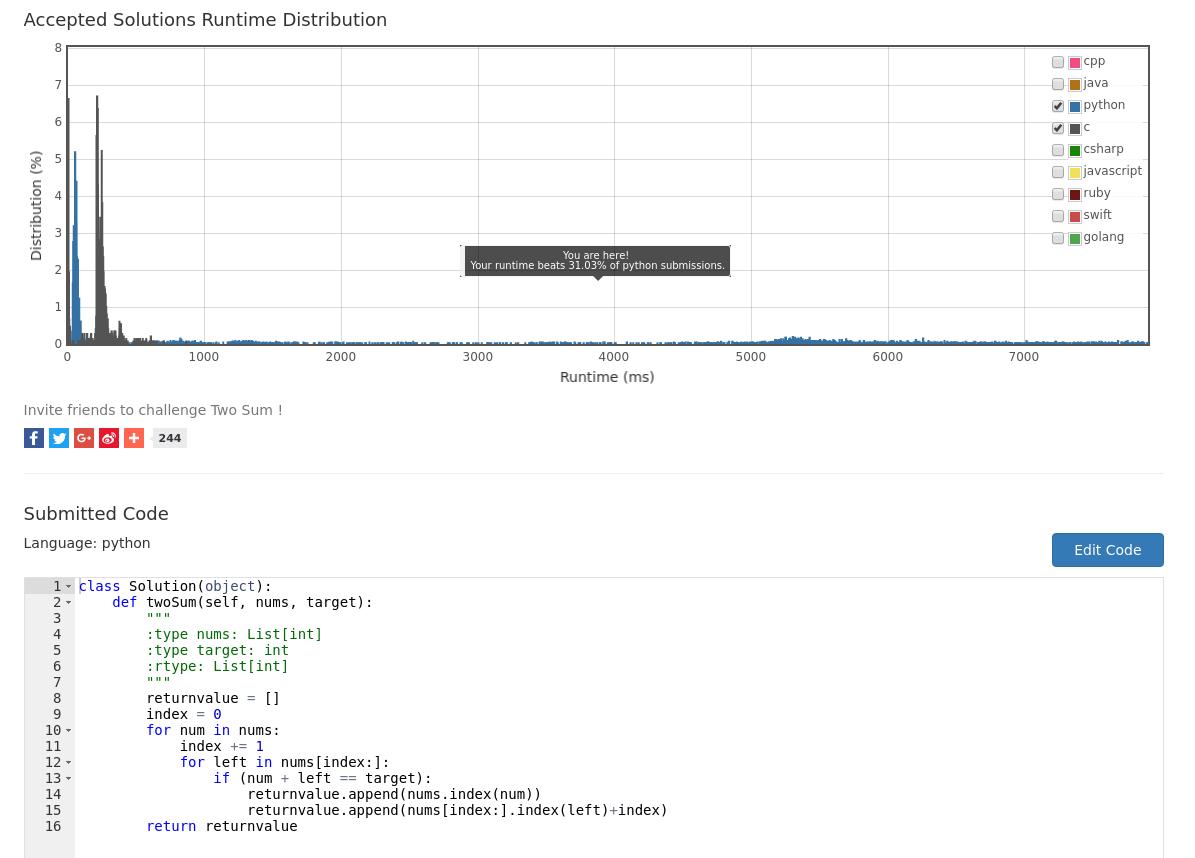
运行后的结果,不是那么理想,只击败了34%左右的提交结果:
Python Hash
经过几番修改以后的代码如下,只循环一次,因而算法复杂度为O(n):
class Solution(object):
    def twoSum(self, nums, target):
        """
        :type nums: List[int]
        :type target: int
        :rtype: List[int]
        """
        # Use a dictionary for holding nums
        num_dic = {}
        for i in range(len(nums)):
            if target - nums[i] in num_dic.keys():
                return [num_dic[target - nums[i]],i]
            else:
                # directly put it into the num_dic
                num_dic[nums[i]] = i
        return []

print (Solution().twoSum([0,4,3,0], 0))
print (Solution().twoSum([3, 4, 2], 6))
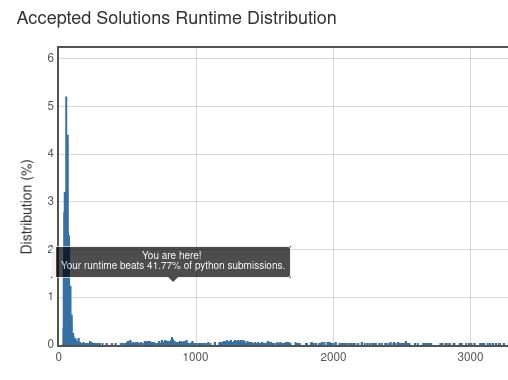
速度稍微提升了一些:
更好的方案,优化:
class Solution(object):
    def twoSum(self, nums, target):
        """
        :type nums: List[int]
        :type target: int
        :rtype: List[int]
        """
        # Use a dictionary for holding nums
        num_dic = {}
        for i,v in enumerate(nums):
            if v in num_dic.keys():
                return [num_dic[v],i]
            num_dic[target-v] = i

print (Solution().twoSum([0,4,3,0], 0))
print (Solution().twoSum([3, 4, 2], 6))
这个代码大概能跑到击败80%左右的提交答案。
思考1: enumerate()函数调用减少了时间。
思考2: 原代码中有两次减法,而修改后的代码中,只是在写入hash的时候,有一次target-v的减法操作。
思考3: 去掉了一次不必要的return操作。
总结:
Python里对于这个问题的优化大概就到这里了。可以看到,简单的问题也是需要认真思考了,认认真真的来
做leetcode吧。
2. Add Two Numbers
题目说明:
给定两个用链表表示的非负数。数字存储是reverse order, 每个节点存有一个数字。将节点上的数字
相加,以得到一个新的链表
Input: (2 -> 4 -> 3) + (5 -> 6 -> 4)
Output: 7 -> 0 -> 8
Oct10晚上的测试框架写成这样:
/**
 * Definition for singly-linked list.
 * struct ListNode {
 *     int val;
 *     struct ListNode *next;
 * };
 */

#include <stdio.h>
#include <stdlib.h>


// Definition of the ListNode
struct ListNode {
    int val;
    struct ListNode *next;
};

// create_list()
struct ListNode* create_list(int val)
{
	printf("\n Creating list with headnode as [%d]\n", val);
	struct ListNode *ptr = (struct ListNode*)malloc(sizeof(struct ListNode));
	if(NULL == ptr)
	{
		printf("\n Node creation failed \n");
		return NULL;
	}
	ptr->val = val;
	ptr->next = NULL;

	return ptr;
}

// print the list
void print_list(struct ListNode* head)
{
	struct ListNode*  current = head;

	while(current != NULL)
	{
		printf("%d ->", current->val);
		current = current->next;
	}
	printf("NULL\n");
}

int shiftnumber = 0;

struct ListNode* addTwoNumbers(struct ListNode* l1, struct ListNode* l2) {
	printf("\nJust Called this function!\n");

	struct ListNode* currentl1 = l1;
	struct ListNode* currentl2 = l2;
	// Holding the return value
	struct ListNode* ptr = (struct ListNode*)malloc(sizeof(struct ListNode));
	struct ListNode* head = ptr;
	ptr->next = NULL;
	shiftnumber = 0;


	// First calculate the longest Linked List
	int lenl1 = 0;
	int lenl2 = 0;

	while(currentl1 != NULL)
	{
		lenl1++;
		currentl1 = currentl1->next;
	}
	while(currentl2 != NULL)
	{
		lenl2++;
		currentl2 = currentl2->next;
	}
	printf("len1 is %d, len2 is %d\n", lenl1, lenl2);

	currentl1 = l1;
	currentl2 = l2;

	// Get the largest length, thus we could do some tricks.
	//
	//
	//
	//
	//
	while((currentl1 != NULL) && (currentl2 != NULL))
	{
		ptr->val = (currentl1->val + currentl2->val)%10+shiftnumber;
		shiftnumber = 0;
		if((currentl1->val + currentl2->val)>=10)
		{
		    shiftnumber = (currentl1->val + currentl2->val)/10;
		}
		//ptr->val = (currentl1->val + currentl2->val)%10;
		if(currentl1->next != NULL)
		{
		    ptr->next = (struct ListNode*)malloc(sizeof(struct ListNode));
		    ptr->next->next = NULL;
		    ptr = ptr->next;
		}
		// shiftnumber exists, so you should assign shiftnumber to the
		// newnode
		else
		{
			// Only check shiftnumber
			if(shiftnumber != 0)
			{
		          ptr->next = (struct ListNode*)malloc(sizeof(struct ListNode));
		          ptr->next->next = NULL;
			  ptr->next->val = shiftnumber;
			}

		}
		currentl1 = currentl1->next;
		currentl2 = currentl2->next;
	}
	return head;
}


int main(void)
{
	struct ListNode test1, test1_2, test1_3;
	struct ListNode* p = &test1;
	p->val = 2;
	p->next = &test1_2;
	p->next->val = 4;
	p->next->next = &test1_3;
	p->next->next->val = 4;
	p->next->next->next = NULL;
	printf("### List l1!\n");
	print_list(p);

	struct ListNode test2, test2_2, test2_3;
	struct ListNode* q = &test2;
	q->val = 5;
	q->next = &test2_2;
	q->next->val = 6;
	q->next->next = &test2_3;
	q->next->next->val = 7;
	q->next->next->next = NULL;
	printf("### List l2!\n");
	print_list(q);

	printf("\n *** Start testing addTwoNumbers! *** \n");
	struct ListNode* r = addTwoNumbers(p, q);
	print_list(r);
	// Remember to free memory here
	//while(r->next != NULL);
	//{
	//	printf("See if you could get the money?\n");
	//	r = r->next;
	//}

	printf("\n *** Finished testing addTwoNumbers! *** \n");

	return 0;
}
一塌糊涂啊!!!明天继续写。
最后独立写出的答案如下,非常难看。
int shiftnumber = 0;

struct ListNode* addTwoNumbers(struct ListNode* l1, struct ListNode* l2) {
	struct ListNode* currentl1 = l1;
	struct ListNode* currentl2 = l2;
	// Holding the return value
	struct ListNode* ptr = (struct ListNode*)malloc(sizeof(struct ListNode));
	struct ListNode* head = ptr;
	ptr->next = NULL;
	shiftnumber = 0;


	// First calculate the longest Linked List
	int lenl1 = 0;
	int lenl2 = 0;

	while(currentl1 != NULL)
	{
		lenl1++;
		currentl1 = currentl1->next;
	}
	while(currentl2 != NULL)
	{
		lenl2++;
		currentl2 = currentl2->next;
	}

	currentl1 = l1;
	currentl2 = l2;

	// Get the largest length, thus we could use this number for controlling the
	// return value.
	int LinkedListLen = lenl1>lenl2?lenl1:lenl2;
	while(LinkedListLen > 0)
	{
		LinkedListLen--;
		int ValOfL1, ValOfL2 = 0;
		ValOfL1 = (currentl1 == NULL)?0:currentl1->val;
		ValOfL2 = (currentl2 == NULL)?0:currentl2->val;
		ptr->val = ((ValOfL1 + ValOfL2)%10 + shiftnumber)%10;
		if(((ValOfL1 + ValOfL2)%10 + shiftnumber) == 10)
		{
		    shiftnumber = 1;
		}
		else{
		shiftnumber = 0;
		    if((ValOfL1 + ValOfL2)>=10)
		    {
		        shiftnumber = (ValOfL1 + ValOfL2)/10;
		    }
		}
		// Allocate memory for new node. Only allocate (LinkedListLen - 1) times
		if(LinkedListLen > 0)
		{
		    ptr->next = (struct ListNode*)malloc(sizeof(struct ListNode));
		    ptr->next->next = NULL;
		    ptr = ptr->next;
		}
		// Switch to next node.
		if(currentl1 != NULL)
		{
		    currentl1 = currentl1->next;
		}
		if(currentl2 != NULL)
		{
		    currentl2 = currentl2->next;
		}
	}
	// If shiftnumber > 0, allocate a new node for holding it
	if(shiftnumber != 0)
	{
		ptr->next = (struct ListNode*)malloc(sizeof(struct ListNode));
		ptr->next->next = NULL;
		ptr->next->val = shiftnumber;
	}

	return head;
}
我的思路:
1,考虑到两个输入的链表长度可能不一样,因而先得到最长的链表长度,用这个最长的长度来做递归。
2, 是否有进位通过一个全局表两shiftnumber来hold. 如果相加到最后依然有进位,则在循环外开辟一块空间来存放这个进位。
3, 两个链表中的任何一个一旦走到了NULL指针,则其值用0来代替。
4, 三目运算符的使用。
5, ptr->val = ((ValOfL1 + ValOfL2)%10 + shiftnumber)%10;,这个是考虑到test case:
[9]
[1, 9]
如果不做的话,则得出结果会是[0,10], 进位和该位数字的和为10的时候需要单独考虑。
反思:
1, 对指针的使用要非常小心。
2, 就是凭直觉写出来的,算法很差, 代码可读性也很差。
Longest substr
The sample code is listed, while to be optimized:
#include <stdio.h>
#include <stdlib.h>
#include <string.h>

#define MAXN 50000

// q should be longer than p
int comlen(char* p, char* q)
{
    int i = 0;
    while (*q && (*p++ == *q++))
    {
        i++;
    }
    return i;
}

int cstring_cmp(const void *a, const void *b)
{
    const char **ia = (const char **)a;
    const char **ib = (const char **)b;
    return strcmp(*ia, *ib);
}


int lengthOfLongestSubstring(char* s) {
      char c[MAXN];
      char* a[MAXN];


      // Create a new array which hold char *s
      // Remove all of the duplicated items in array
      // no_duplicated[]

      char ch;
      int n = 0;
      for(n = 0; n < strlen(s); n++)
      {
          printf("%c ",s[n]);
          a[n] = &c[n];
          c[n] = s[n];
      }
      a[n] = 0;

      qsort(a, n, sizeof(char*), cstring_cmp);

      int maxlen = 0;
      int len = 0;
      int maxi = 0;
      for (int i = 0; i < n - 1; i++)
      {
          len = comlen(a[i], a[i + 1]);
	  printf("len is %d\n", len);
          if (len > maxlen)
          {
              maxlen = len;
              maxi = i;
          }
      }

      printf("maxlen:%d\tmax string:\t", maxlen);
      char ch_tmp;
      for (int i = 0; i < maxlen; i++)
      {
          ch_tmp = *(a[maxi] + i);
          printf("%c", ch_tmp);
      }
      printf("\n");

      return maxlen;
}

int main(void)
{
	char s[100] = "abcabcccc";
	char t[100] = "bbbbbbbbbbbb";
	char k[100] = "pwwkew";
	lengthOfLongestSubstring(s);
	lengthOfLongestSubstring(t);
	lengthOfLongestSubstring(k);
	return 0;
}