Feb 10, 2017
TechnologyRefers to:
https://blog.tinned-software.net/automount-a-luks-encrypted-volume-on-system-start/
Disk Partition Encryption
Steps for encryption of vdb1:
# dd if=/dev/urandom of=/root/vdb_secret_key bs=512 count=8
# cryptsetup -v luksAddKey /dev/vdb1 /root/vdb_secret_key
# cryptsetup luksDump /dev/vdb1 | grep "Key Slot"
# cryptsetup -v luksOpen /dev/vdb1 vdb1_crypt --key-file=/root/vdb_secret_key
# cryptsetup -v luksClose vdb1_crypt
Add following line for auto decryption:
# vim /etc/crypttab
vdb1_crypt UUID=43740d4f-df91-492e-8d06-b32f461a633e /root/vdb_secret_key luks
While UUID is generated via following command:
# cryptsetup luksDump /dev/vdb1 | grep "UUID"
Add lines into /etc/fstab:
/dev/mapper/vdb1_crypt /media/vdb1 ext4 defaults 0 2
Volume Encryption
For storing contents in an encrypted file, do following steps:
# dd if=/dev/zero of=/root/luks.vol bs=1M count=1024
# cryptsetup --cipher aes-xts-plain64 --key-size 512 --hash sha512 --iter-time 10000 luksFormat /root/luks.vol
# cryptsetup luksOpen /root/luks.vol file
# ls /dev/mapper/
# mkfs.ext4 /dev/mapper/file
Now we begin to use keyfile for unlock this partition:
# dd if=/dev/urandom of=/root/file_key bs=512 count=8
# cryptsetup -v luksAddKey /root/luks.vol /root/file_key
# cryptsetup -v luksOpen /root/luks.vol vol_crypt --key-file=/root/file_key
# cryptsetup -v luksClose vol_crypt
Get the UUID of the luks.vol:
# cryptsetup luksDump /root/luks.vol | grep "UUID"
Now you could add following lines into /etc/rc.local:
cryptsetup -v luksOpen /root/luks.vol vol_crypt --key-file=/root/file_key
mount /dev/mapper/vol_crypt /media/vol
Feb 9, 2017
Technology以下记录安装好加密磁盘后,免密码登录配置。
keyfile生成及配置
生成加密keyfile:
# dd if=/dev/urandom of=/boot/keyfile bs=1024 count=4
用加密的keyfile解锁加密盘:
# cryptsetup luksAddKey /dev/vda2 /boot/keyfile --key-slot 1
Enter any existing passphrase:
dracut配置
更改/usr/lib/dracut/modules.d/90crypt/cryptroot-ask.sh文件:
info "luksOpen $device $luksname $luksfile $luksoptions"

+++ # Unlock with USB key
+++ sleep 3
+++ udevsettle
+++ usbkey=/dev/disk/by-uuid/8cc8c3fe-8b6d-4adf-aab5-e3b9e758b622
+++ if [ -e $usbkey ]; then
+++   ask_passphrase=0
+++   echo "USB Key detected - unlocking partition $device ..."
+++   echo "mkdir"
+++   mkdir -p /mnt
+++   echo "mount"
+++   mount $usbkey /mnt
+++   echo "unlock"
+++   cat /mnt/keyfile | cryptsetup luksOpen $device $luksname --key-file=-
+++ fi
因为我们使用了几条命令,所以需要将可执行文件打包进去:
# vi /usr/lib/dracut/modules.d/90crypt/module-setup.sh
    dracut_need_initqueue
+++    inst /usr/bin/cat
+++    inst /usr/bin/mkdir
+++    inst /usr/bin/mount
}
然后更改有关dracut的配置,
# dracut modules to omit
omit_dracutmodules+="systemd"

# dracut modules to add to the default
add_dracutmodules+="crypt"
执行dracut -f生成新的initramfs,重新启动,机器将自动进入系统.
Feb 8, 2017
Technology准备
三台虚拟机,Ubuntu16.04 安装盘,virt-manager.
角色配置
虚拟机A:未加密,Ubuntu16.04安装。
虚拟机B: encrypted LVM, 安装Ubuntu16.04.
虚拟机C:Test Machine.
加密配置
每次启动时避免输入密码的配置, 在虚拟机B上作如下配置:
首先备份initrd.img:
# cp /boot/initrd.img-4.4.0-31-generic /boot/initrd.img-4.4.0-31-generic.safe
在未经加密的/boot分区生成加密的key文件:
# dd if=/dev/urandom of=/boot/keyfile bs=1024 count=4
查看加密分区情况:
$ sudo blkid | grep -i crypto
/dev/vda5: UUID="a255260b-30eb-4630-b9c9-a6b7f75b236e" TYPE="crypto_LUKS" PARTUUID="2a203ff6-05"
从上面可以看出vda5是我们的加密风趣,现在将新创建的keyfile作为加密卷的解锁文件:
# cryptsetup -v luksAddKey /dev/vda5 /boot/keyfile
Enter any passphrase:
输入你以前创建的密码,看到以下输出时代表解锁文件添加成功:
Key slot 0 unlocked.
Command successful.
现在更改/etc/crypttab文件:
# cp /etc/crypttab /root/
# vim /etc/crypttab
vda5_crypt UUID=a255260b-30eb-4630-b9c9-a6b7f75b236e /dev/disk/by-uuid/36747581-1841-47de-9ce2-b1262e1eb167:/keyfile luks,keyscript=/lib/cryptsetup/scripts/passdev
其中/ev/disk/by-uuid的字段可以通过blkid来获得,即/boot的uuid值。
如果无法修改该文件,记得改变其权限,修改完毕后,更改回以下权限:
# chmod 0440 /etc/crypttab
重新生成内核并启动:
# mkinitramfs -o /boot/initrd.img-4.4.0-31-generic 4.4.0-31-generic
系统更新
测试一下系统更新对加密磁盘的影响, 无。
Feb 4, 2017
TechnologyWebCam Detection
Detect the USB equipment via:
# lsusb
Bus 002 Device 002: ID 0b95:772b ASIX Electronics Corp. AX88772B
Bus 002 Device 001: ID 1d6b:0002 Linux Foundation 2.0 root hub
Bus 008 Device 002: ID 0c45:0011 Microdia EBUDDY
Bus 008 Device 001: ID 1d6b:0001 Linux Foundation 1.1 root hub
Bus 007 Device 001: ID 1d6b:0001 Linux Foundation 1.1 root hub
Bus 006 Device 001: ID 1d6b:0001 Linux Foundation 1.1 root hub
Bus 001 Device 002: ID 046d:0829 Logitech, Inc.
.....
Then we got more informations from our detected webCAM equipment:
# lsusb -s 001:002 -v | egrep "Width|Height"
        wWidth                            640
        wHeight                           480
        wWidth                            352
        wHeight                           288
.....
Software
Install guvcview for detection the cameral and take pictures:
# pacman -S guvcview
Now using guvcview you could get the pictures.
Jan 24, 2017
TechnologyDisk Configuration
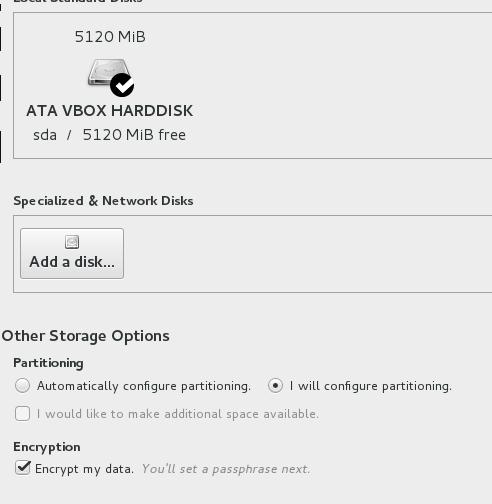
Specify the disk like following, notice we don’t activate the swap partition.
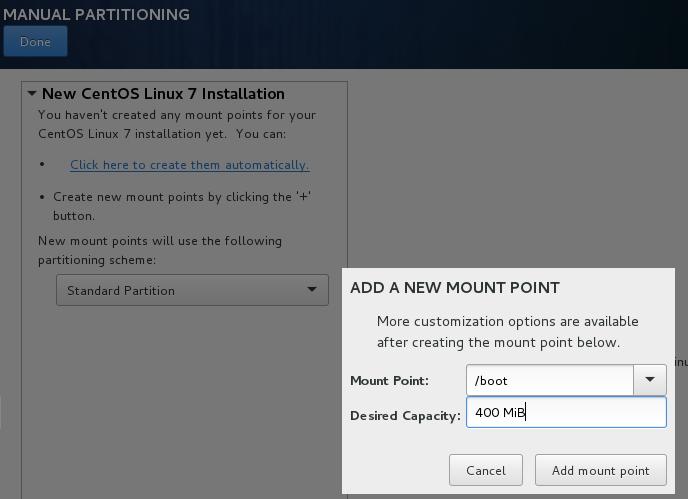
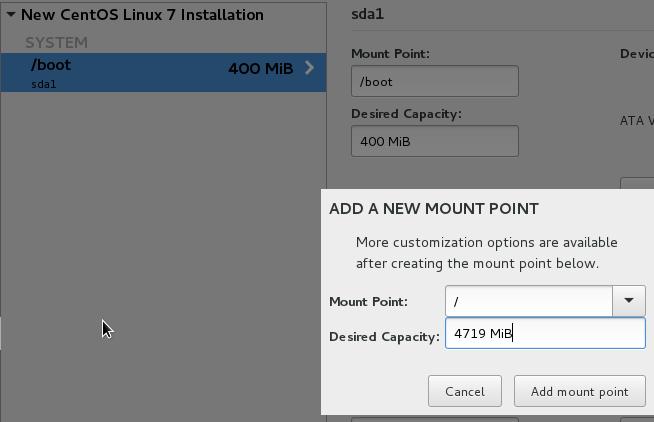
Select the disk and do the following configuration:
Boot partition, should be 400MiB:
Root partition, should contains all of the left space:
Cryption
Refers to:
http://www.gaztronics.net/howtos/luks.php
Generate the secret key file:
# dd if=/dev/sdb of=luks-secret.key bs=1 count=4096
# cryptsetup luksAddKey /dev/sda2 luks-secret.key --key-slot 1
Modify Dracut:
# ls  /dev/disk/by-id | grep usb
usb-SanDisk_Cruzer_Orbit_4C532000050606114400-0:0 -> ../../sda
usb-SanDisk_Cruzer_Orbit_4C532000050606114400-0:0-part1 -> ../../sda1
Remember the id of sda, later we will use it for updating cryptroot-ask.sh
file:
# vim /usr/lib/dracut/modules.d/90crypt/cryptroot-ask.sh
info "luksOpen $device $luksname $luksfile $luksoptions"

+++ # Unlock with USB key
+++ sleep 3
+++ udevsettle
+++ usbkey=/dev/disk/by-id/usb-SanDisk_Cruzer_Orbit_4C532000050606114400-0\:0
+++ if [ -e $usbkey ]; then
+++   ask_passphrase=0
+++   echo "USB Key detected - unlocking partition $device ..."
+++   dd if=$usbkey bs=1 count=4096 | cryptsetup luksOpen $device $luksname --key-file=-
+++ fi


OLD_IFS="$IFS"
Notice the prefixed +++ is the added lines to this file.
Also because the program dd is not loaded by default in CentOS, we need add
following line into /usr/lib/dracut/modules.d/90crypt/module-setup.sh:
# vim /usr/lib/dracut/modules.d/90crypt/module-setup.sh
install() {
    <snip>
    dracut_need_initqueue
+++    inst /usr/bin/dd
}
We need to modify /etc/dracut.conf to stop systemd from running the decryption
process:
# dracut modules to omit
omit_dracutmodules+="systemd"

# dracut modules to add to the default
add_dracutmodules+="crypt"
Create the new initramfs via dracut -f, now insert the usb disk, the decryption
will be automatically executed, enjoy your own usb disk encrypted system!
Hacking
For automatically dracut after system upgrading:
# mkdir -p /root/archive
# mkdir -p /root/scripts
# cp /usr/lib/dracut/modules.d/90crypt/cryptroot-ask.sh  /root/archive
# cp /usr/lib/dracut/modules.d/90crypt/module-setup.sh /root/archive
# vim /root/scripts/update-dracut
    #!/bin/bash
    cp /root/archive/cryptroot-ask.sh /usr/share/dracut/modules.d/90crypt/
    cp /root/archive/module-setup.sh /usr/share/dracut/modules.d/90crypt/
    dracut -f
    exit 0
# chmod 777 /root/scripts/update-dracut
Disable Kernel Update
For we make the updates to initramfs, we’d better disable kernel update for CentOS.
$ sudo vim /etc/yum.conf
exclude=kernel*
Now via yum update you won’t get your kernel related packages update.
LVM Based Encryption
If you use lvm based, then do following things:
# cat /etc/crypttab
luks-189e8c45-2c62-4c08-acb6-b3264c435fd1 UUID=189e8c45-2c62-4c08-acb6-b3264c435fd1 none
# blkid
/dev/sda1: LABEL="XENSERVER-6" UUID="5CD6-02A1" TYPE="vfat"
/dev/sdb1: UUID="d13618c7-b166-4135-8cae-1c5b8c5110fc" TYPE="xfs"
/dev/sdb2: UUID="tZyuzH-wIpt-MtQv-gWsJ-Ld69-zjtQ-TfbL6z" TYPE="LVM2_member"
/dev/mapper/cl-00: UUID="189e8c45-2c62-4c08-acb6-b3264c435fd1" TYPE="crypto_LUKS"
/dev/mapper/luks-189e8c45-2c62-4c08-acb6-b3264c435fd1: UUID="f7a6d197-5afd-46e1-8a69-408de5278405" TYPE="xfs"
Then your command should be like:
# cryptsetup luksAddKey /dev/mapper/cl-00 luks-secret.key --key-slot 1
Make sure the partition is the same as the one you looked as crypto_LUKS.
