
Trouble Shooting On SpaceWalk OSAD On Ubuntu Clients
Aug 12, 2015
Technology
Problem
On Clients(Ubuntu nodes), you will see lots of the following message in
/var/log/osad:
$ tail /var/log/osad
2015-08-11 19:31:14 jabber_lib.main: Unable to connect to jabber servers, sleeping 78 seconds
2015-08-11 19:32:32 jabber_lib.main: Unable to connect to jabber servers, sleeping 117 seconds
When restart the osda service you will see following error message:
# service osad restart
OSAD SpaceWalk Deamon osad                                                     Traceback (most recent call last):
  File "/usr/share/rhn/osad/jabber_lib.py", line 252, in setup_connection
    c = self._get_jabber_client(js)
  File "/usr/share/rhn/osad/jabber_lib.py", line 309, in _get_jabber_client
    c.connect()
  File "/usr/share/rhn/osad/jabber_lib.py", line 583, in connect
    self.disconnect()
  File "/usr/share/rhn/osad/jabber_lib.py", line 653, in disconnect
    jabber.Client.disconnect(self)
  File "/usr/lib/python2.7/dist-packages/jabber/jabber.py", line 432, in disconnect
    xmlstream.Client.disconnect(self)
  File "/usr/lib/python2.7/dist-packages/jabber/xmlstream.py", line 388, in disconnect
    while self.process(): pass
  File "/usr/share/rhn/osad/jabber_lib.py", line 1059, in process
    raise JabberError("Premature EOF")
JabberError: Premature EOF
Though seeing this error, your osad will start and running, but with errors.
Trouble Shooting
Make sure the port 5222 and 5269 of spacewalk server are telnet-able from client machine:
adminubuntu@spacewalknode1:~$ telnet spacewalk 5222
Trying 10.11.11.3...
Connected to spacewalk.
Escape character is '^]'.
^]
telnet> quit
Connection closed.
adminubuntu@spacewalknode1:~$ telnet spacewalk 5269
Trying 10.11.11.3...
Connected to spacewalk.
Escape character is '^]'.
^]
telnet>
Make sure you register yourself on client using FQDN but not the IP Address:
# rhnreg_ks --activationkey=1-precise --serverUrl=http://spacewalk/XMLRPC --force
# service osad restart
If by this you won’t pass the osad check, you should setup the local dns server, which
enable name resolve of spacewalk, you could take following article for reference:
http://purplepalmdash.github.io/blog/2015/08/05/enable-dhcp-slash-dns-server-for-spacewalker-server/
For checking the dns resole, run following command on client:
adminubuntu@spacewalknode1:~$ dig spacewalk

; <<>> DiG 9.8.1-P1 <<>> spacewalk
;; global options: +cmd
;; Got answer:
;; ->>HEADER<<- opcode: QUERY, status: NOERROR, id: 16045
;; flags: qr aa rd ra; QUERY: 1, ANSWER: 1, AUTHORITY: 1, ADDITIONAL: 0

;; QUESTION SECTION:
;spacewalk.                     IN      A

;; ANSWER SECTION:
spacewalk.              604800  IN      A       10.11.11.3

;; AUTHORITY SECTION:
spacewalk.              604800  IN      NS      spacewalk.

;; Query time: 2 msec
;; SERVER: 10.11.11.3#53(10.11.11.3)
;; WHEN: Wed Aug 12 03:34:18 2015
;; MSG SIZE  rcvd: 57
Result
After resolving this problem, your log should like this:
On Server:
$ tail /var/log/message
Aug 12 10:34:50 spacewalk jabberd/c2s[1379]: [9] [::ffff:10.11.11.100, port=45486] connect
Aug 12 10:34:50 spacewalk named[993]: error (network unreachable) resolving 'ns4.p27.dynect.net/A/IN': 2001:500:94::100#53
Aug 12 10:34:50 spacewalk jabberd/c2s[1379]: [9] created user: user=osad-c942811c1c; realm=
Aug 12 10:34:50 spacewalk jabberd/c2s[1379]: [9] registration succeeded, requesting user creation: jid=osad-c942811c1c@spacewalk
Aug 12 10:34:50 spacewalk jabberd/sm[1371]: created user: jid=osad-c942811c1c@spacewalk
Aug 12 10:34:50 spacewalk jabberd/c2s[1379]: [9] legacy authentication succeeded: host=, username=osad-c942811c1c, resource=osad, TLS negotiated
Aug 12 10:34:50 spacewalk jabberd/c2s[1379]: [9] requesting session: jid=osad-c942811c1c@spacewalk/osad
Aug 12 10:34:50 spacewalk jabberd/sm[1371]: session started: jid=osad-c942811c1c@spacewalk/osad
In SpaceWalk backend you will see:
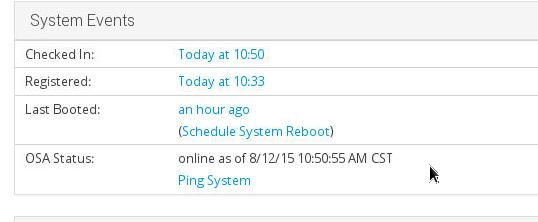
Now you could direct push your modification to clients in SpaceWalk backend.